

All local business owners have experienced this situation. Your report shows you are in position 4, but either your client or your own phone tells a different story: "I searched and you did not show up." Both statements are accurate, since map rankings shift from street to street, and most audits stop at reviewing the profile alone.
We develop audit software professionally, so before creating this guide, we tested the popular free audit tools and checklists just as a business owner would. Nearly all of these tools end at the same step: they evaluate the profile for things like completeness, categories, photos, posts, and review count, but do not go beyond that. The guides that come with these tools claim a manual audit takes between 15 and 60 minutes. That estimate is accurate for a basic profile review, but it also explains why most audits do not lead to improvements: the checks that actually forecast rankings are found outside the profile, such as in your review growth rate, your website, your citations, and most importantly, your real ranking positions on the map.
Here is our complete checklist of 21 steps, arranged in the most practical order for manual review. Whether you call it a local SEO audit, a Google Business Profile audit, or use the old term GMB audit, it is the same thorough process. Eighteen of these checks only require your time, and for each, this guide explains how to do it yourself, what a successful result looks like, and the most common error we encounter. Three of the checks require paid data sources, and we clearly indicate when that is the case, since it is helpful to know about these steps even if you choose not to purchase access.
Before we begin, all the screenshots shown in this guide are genuine. They are taken from a real audit of Pure Controls, a pest control business located in Perth, Australia. This company has a five star rating and runs professionally, but as you will see, it serves as an example of how little the profile surface actually reveals. We will track their data throughout the entire checklist.
First, 90 seconds on how local rankings actually work
Google has long stated that local rankings depend on three main factors: relevance (whether the business matches what the searcher wants), distance (the business’s proximity to the searcher), and prominence (how well known and reputable the business is, both on Google and elsewhere). Every recommendation in this guide supports one of these. Categories, services, and your website help with relevance. Reviews, links, and citations contribute to prominence. While you cannot alter distance, you can see exactly how far your relevance and prominence can take you before proximity favors a competitor who is closer.
That final point explains why a thorough audit measures rankings from multiple locations, not just a single spot. Relevance and prominence relate to your business, but the ranking depends on where the searcher is. A single number cannot capture this, just as one temperature reading cannot represent an entire country. Remember this for part 5, since this is where most audits, even costly ones, often fail without saying so.
Relevance
Do you do what they searched for?
Checks 1, 2, 8, 9, 17
Distance
How far are you from the searcher?
Measured by checks 14, 15
Prominence
How known and trusted are you?
Checks 5, 6, 7, 11, 12
Google's three local ranking pillars, and where each check in this guide lands. Distance cannot be built, only measured.
The five areas, in audit order
- The actual profile (items 1 through 4)
- Reviews (looks at 5 to 7)
- Website and authority (items 8 through 12)
- Site performance (see check 13)
- Map visibility (items 14 through 18)
Then three synthesis steps (19 to 21), the full case study, how to run all of this in one report, and the whole list on one screen.
Part 1: The profile itself
Begin with these steps since they are quick, cost nothing, and you can resolve them immediately. Do not make the common mistake of stopping after this point, which is where checklist advice often falls short. Having a flawless profile only gets you in the door; it does not guarantee success.
Primary category fit
The primary category is the strongest single lever on the entire profile. Google largely decides which searches you are eligible for based on it, and eligibility comes before ranking: with the wrong primary category you are not losing the auction, you are not in the room.
Businesses drift into near-miss categories all the time, usually at setup, and never revisit the choice. The test is never "is this category accurate", it is "is this the category the winners use". In our audits, category fit is scored against the keywords you want rather than in isolation, and the report includes a category consensus table: how many of the profiled competitors declare each category, so you can see the market's answer instead of guessing.
Do it yourself: Search your main keyword in Google Maps, open the top 3 profiles in your pack, and note their primary category (it is the first one shown under the business name). Compare against yours in the Business Profile dashboard. Repeat for your second keyword, because the answer can differ.
What good looks like: Your primary category matches what the current top 3 use for your money keyword. Secondary categories cover your other services without stretching into things you do not do.
The usual mistake: Choosing the category that describes the business best instead of the one the map pack actually rewards. A garage door company can be 'Garage door supplier' or 'Garage door installer' or 'Contractor'; only one of those wins the searches that pay, and the way to find out which is to look at who is winning now.
Completeness: hours, phone, website, attributes, services
Completeness is not a ranking silver bullet, and anyone who tells you filling in attributes will move you from 9 to 3 is selling something. What completeness does is convert: a profile with services listed, current hours and a direct link answers the searcher's next three questions without a click, and Google measures engagement with the profile.
The service list deserves special attention. Each service you list is a relevance hint, and most businesses list three when they sell ten. Write them the way customers search, one per line, and resist the urge to stuff keywords into the descriptions; a service list is a menu, not a ransom note. Our reports run this comparison as a head-to-head: your attributes, hours and service catalog side by side with each competitor's, because "complete" is relative to the market too.
Do it yourself: Open your profile as a customer in an incognito window. Check every field: hours including holiday hours, phone, website link, appointment link, the full service list, attributes like wheelchair access or free estimates. Anything empty is a point Google offers that you declined.
What good looks like: No empty field a customer could care about, hours accurate to reality, and the website link pointing at your location or service page rather than a generic homepage.
The usual mistake: Setting hours once and never touching them. Wrong evening and weekend hours are the most expensive small error on the platform, because they hand your after-hours calls to whoever is listed as open.
Photos: count, recency and what they show
Photos are a proxy Google can measure for whether a business is alive and cared for. A profile whose newest photo is two years old reads like a business that might be too. Customers use them the same way: before-and-after shots, the team, the vehicle they should look for at the kerb.
There is a second-order effect worth knowing: photos generate views, views generate profile engagement, and engagement correlates with pack stability. It costs one phone and a habit. Take photos on real jobs, upload weekly, and let the competitors keep their stock images of handshakes.
Do it yourself: Count your photos and note the date of the newest one. Open the top 3 competitors and count theirs. You now have the two numbers that matter: the gap, and the days since your last upload.
What good looks like: Photo count within range of the pack leaders, something new in the last 60 days, and a set that shows real work, real people and the storefront, not stock imagery.
The usual mistake: Uploading twenty photos in one afternoon and none for the next year. Recency is measured continuously; a steady trickle beats an annual dump.
Operational status and suspension risk
This is the boring check that protects everything else. Google edits profiles from user suggestions and its own crawling, and it does not always tell you. Categories change, hours change, occasionally a profile gets marked closed by a malicious report. Five minutes a month catches all of it early.
Suspension risk is the part audits skip because it has no score. We include it anyway: an audit that recommends aggressive tactics without checking your exposure is measuring the upside and ignoring the downside. Ranking gains mean nothing on a profile that gets removed.
Do it yourself: Search your exact business name in Maps and confirm the profile is live, not marked closed, and not carrying edits you never made. Then open the dashboard and check for pending Google-suggested edits and for warnings. Finally, reread your business name field: does it match your signage exactly?
What good looks like: Live, verified, no unapproved edits, and a business name with no keywords stuffed into it that are not on your sign.
The usual mistake: Treating the name field as free keyword space. 'Smith Plumbing | Emergency Plumber Mesa 24/7' works right up until a competitor reports it, and a suspension takes the whole profile off the map for weeks while you appeal.
Part 2: Reviews
People always look at the star rating. What really sets businesses apart in the map pack, though, is not usually the rating itself but the speed at which new reviews come in compared to those ranked higher. Ratings reflect the past, while velocity shows what is happening currently, and Google clearly favors current activity. Our case from Perth highlights this: despite having a five-star rating, the most harmful discovery in the entire report is found right here.
Review count and rating, against the pack, not in a vacuum
A rating only means something relative to the local market, which is why our reports render this check as a head-to-head table rather than a lone number. The same 4.4 is a strength in a suburb where the pack averages 4.1 and a liability where it averages 4.8.
Pure Controls holds a perfect 5.0, a tenth above the market median. It also holds 1 review, against a competitor median of 361. The audit flagged that as the number one critical issue in the entire report, above every website and visibility finding. One review is not a reputation, it is a rounding error, and no rating can compensate for it.
Do it yourself: Write down the count and rating for you and for each of the top 3 in your pack. The gaps are the numbers that matter, not your absolutes.
What good looks like: Rating within 0.2 of the pack leaders and a count in the same order of magnitude. A 4.9 with 12 reviews loses to a 4.6 with 480, in rankings and in the customer's eye.
The usual mistake: Celebrating a high rating on a tiny base. Twelve reviews is not a rating, it is an anecdote, and both Google and customers treat it that way.
Review velocity
This is the review signal that actually moves packs, and it is invisible on the profile surface. Two businesses can both show 300 reviews while one earned 250 of them in the last two years and the other in 2019. Google can see the difference. So can you, with ten minutes of scrolling.
In the Perth report the velocity check came back at zero reviews in 90 days. The fix costs nothing: a review request on every completed job, the same day, with a direct link. Two a week closes most gaps in most markets within a year, which sounds slow until you notice it is also exactly how the market got to a median of 361.
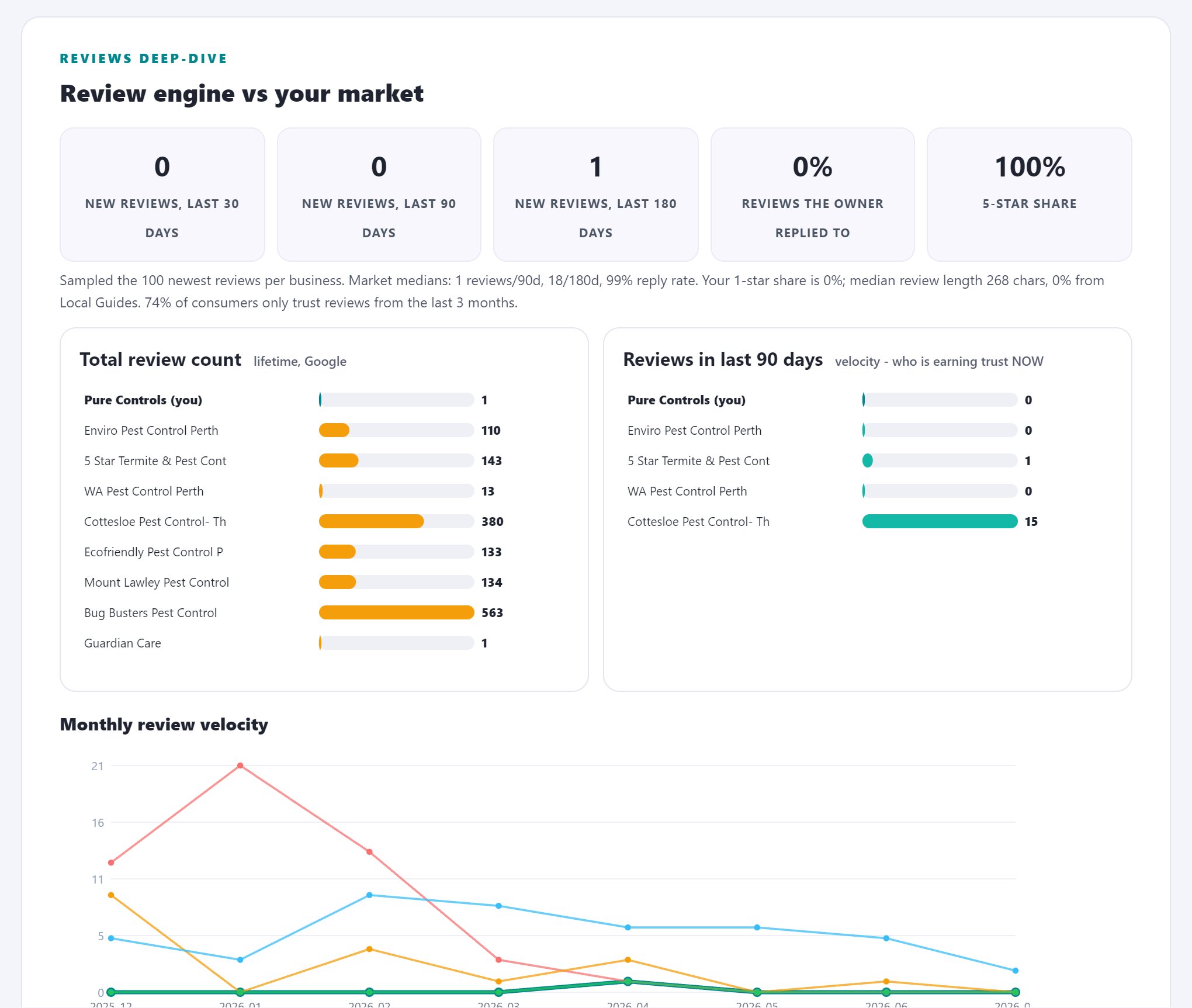
Do it yourself: Sort reviews by newest for you and for the pack leaders. Count how many arrived in the last 90 days, divide by three, and you have monthly velocity for every player in your market.
What good looks like: Your monthly rate at or above the pack median. If the leader gets 15 a month and you get 2, the gap widens every month you leave it alone, because velocity compounds.
The usual mistake: Running a review push for three weeks, hitting a milestone, and stopping. Velocity is a rate, not a total; the system you build matters more than any campaign.
Owner responses
Responses are read by the next customer far more than by the reviewer. A wall of unanswered one-star reviews costs conversions even when rankings hold, because the searcher who found you is not yet the customer who calls you.
The negative-review reply is a skill worth practising once: acknowledge the specific issue, state what changed, invite the conversation offline. No lawyering, no essay. You are not writing to win the argument, you are writing to show the next hundred readers who you are under pressure. Our report also pulls recent competitor reviews verbatim into this section, because what their customers praise and complain about is your positioning research, free.
Do it yourself: Look at your last 20 reviews. Count how many have an owner reply, and check the reply dates against the review dates. Read your three most recent negative reviews and their replies as if you were a stranger.
What good looks like: Most reviews answered within a few days, negative ones within 24 hours, and replies that read like a person: specific, calm, and short.
The usual mistake: Template replies. 'Thank you for your valuable feedback' pasted forty times signals the opposite of caring, and every prospective customer scrolling your reviews sees the pattern in seconds.
Part 3: Website and authority
Your profile determines if you are able to compete, but your website is usually what determines if you actually win. The website provides most of the relevance signals and all authority signals. This is also the point where audits divide into two types: those that only look at your homepage, and those that actually measure.
Title tag and H1 on the linked page
This is the single most common website failure we see in audits, and it costs nothing to fix. The linked page is the strongest thread between your profile and your site, and thousands of local businesses hand Google a page that never says what they do or where they do it.
While you are in the source, skim the rest of the page for your city name and your services in actual sentences. A page can be beautiful and empty. Google reads the words.
Do it yourself: Open the page your profile links to. Press F12 or view source, and read the title tag and the first heading. Do they name your main service and your city? Now do the same for the top competitor's site.
What good looks like: A title like 'Emergency Plumber in Mesa, AZ | Smith Plumbing' beats 'Home'. Service plus city in the title and the H1, written for a person, not a keyword pile.
The usual mistake: Linking the profile to a homepage that says 'Welcome' while your service pages sit three clicks deep. Google connects the profile to the exact page it links to; make that page carry the message.
LocalBusiness schema
Schema is machine-readable proof of who and where you are. Most small business sites have none, so having it correct is a cheap edge. It also feeds the systems beyond classic search: the assistants and answer engines of check 18 lean on structured data more, not less. Because the fix is pure copy-paste, our report generates the correct LocalBusiness schema from your live profile and hands it to you ready to ship.
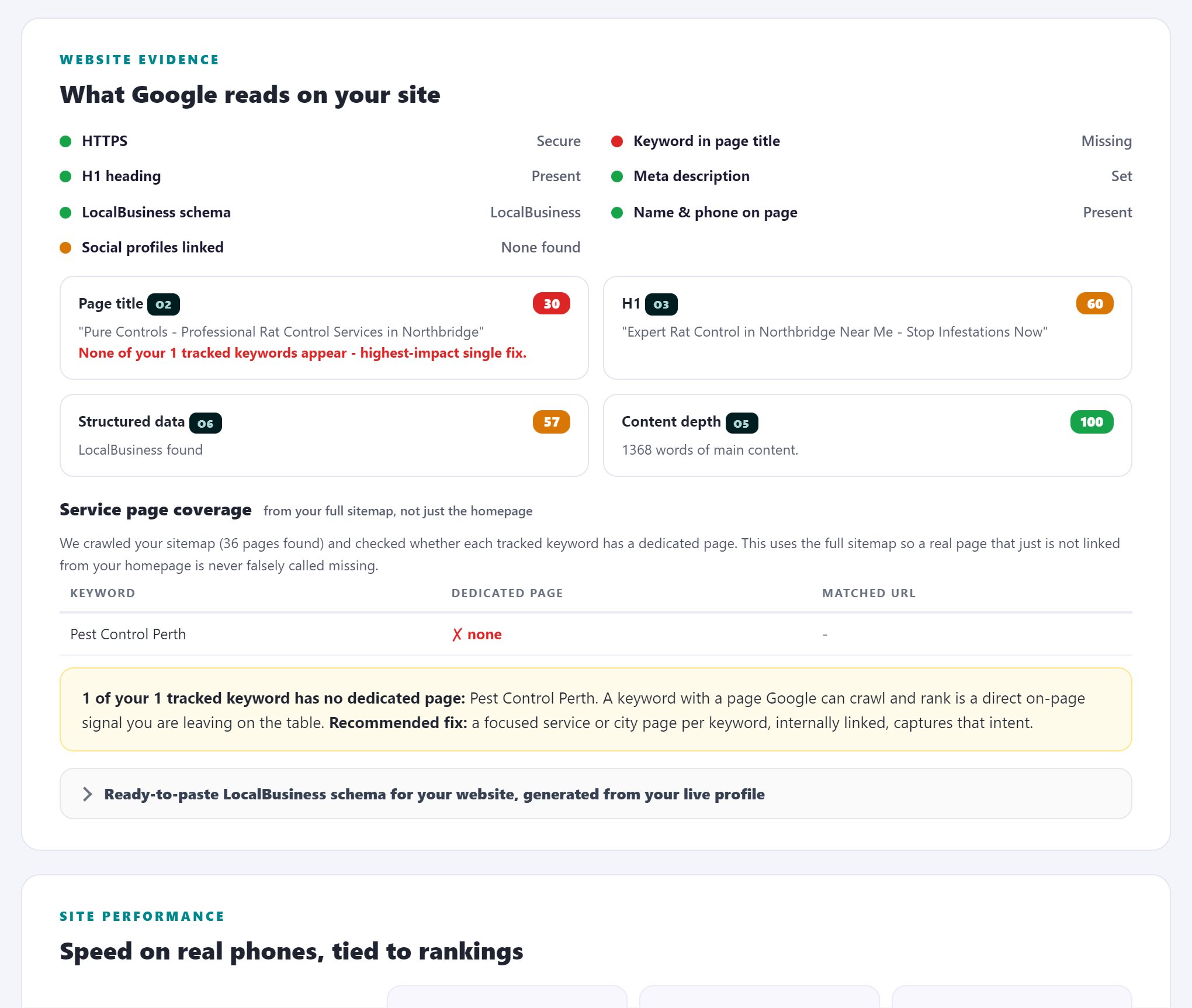
Do it yourself: Paste your URL into Google's Rich Results Test, which is free, and look for LocalBusiness structured data. Check that the name, address and phone inside it match your profile exactly.
What good looks like: LocalBusiness schema present, valid, and agreeing with the profile character for character.
The usual mistake: Schema installed by a plugin years ago that still carries the old address or a tracking phone number. Wrong schema is worse than none, because it is a machine-readable contradiction.
NAP match between site and profile
Inconsistency does not tank rankings by itself, but it erodes the certainty Google needs to merge every mention of you into one entity. Certainty is the currency of the whole local system: the more certain Google is that all these mentions are the same business, the more each mention counts.
Do it yourself: Compare name, address and phone on your website footer and contact page against the profile, character by character. 'Suite 4' vs 'Ste #4' counts. So does 'Smith Plumbing' vs 'Smith Plumbing LLC'.
What good looks like: One canonical spelling of the business name, address and phone everywhere you control, starting with your own site.
The usual mistake: Call tracking numbers pasted straight into the site, breaking the phone match. If you use tracking numbers, implement them so the canonical number stays in the markup.
Citation and NAP sweep across the major directories
This is the local citation audit, and by hand it is the most tedious check on the list, easily an hour for a dozen directories, which is why it goes unchecked for years at most businesses. Our audit sweeps the major directories automatically and diffs every field against the canonical Google listing, and the one-click NAP repair exists because we watched people find the errors and then not fix them.
However you do it, do it. A wrong phone number on a major directory is a slow leak that never stops on its own, and a ghost listing at an old address actively splits your review history and your ranking signals in two.
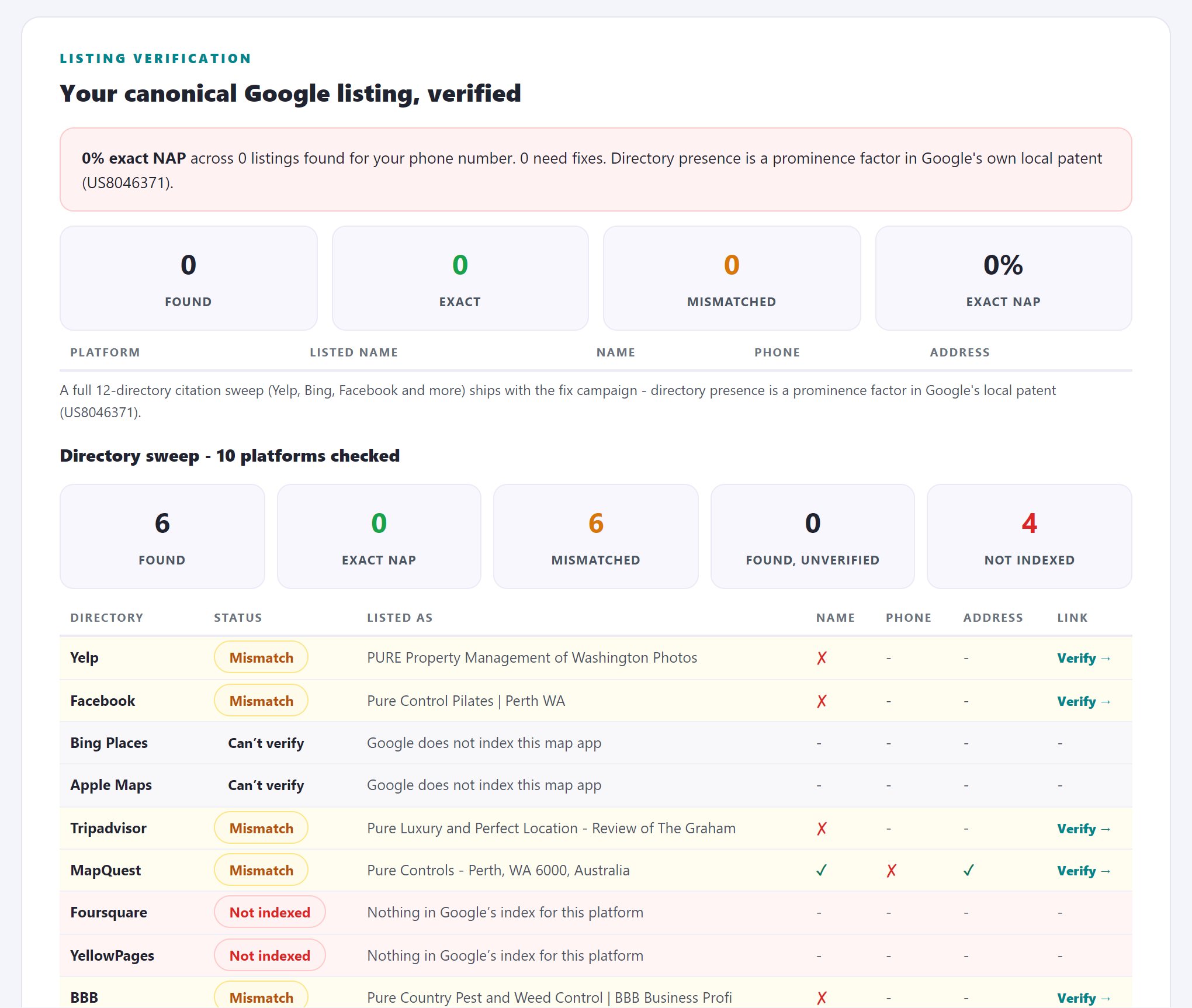
Do it yourself: Search your business name plus phone number, then your name plus your old address if you have ever moved. Work through the major directories one by one: the data aggregators, the review platforms, the map providers. Note every mismatch and every duplicate listing.
What good looks like: Consistent name, address and phone on every major directory, no duplicate listings, and no ghost listing alive at a previous address.
The usual mistake: Fixing the top two directories and calling it done. The aggregators feed dozens of smaller sites; a wrong entry at the source re-infects everything downstream months later.
Domain authority and the backlink gap
Two businesses with identical profiles do not rank identically, and links are usually the difference. Prominence, the third pillar from the primer, is substantially a link phenomenon, and it is the part of local SEO most owners never see because the data to see it costs money.
The Perth report scored the site's domain rank at zero against a competitor median of 145: not weak, zero, effectively no measured authority at all. That single number reframed the whole engagement, because no amount of profile polishing outruns an authority gap. This check is one of the reasons a serious audit costs money to produce: the link indexes behind it are commercial datasets. We license them, and the report shows your authority next to every competitor and lists the exact domains that link to them and not you. When an audit is free and shows you none of this, it is not because it was not worth showing.
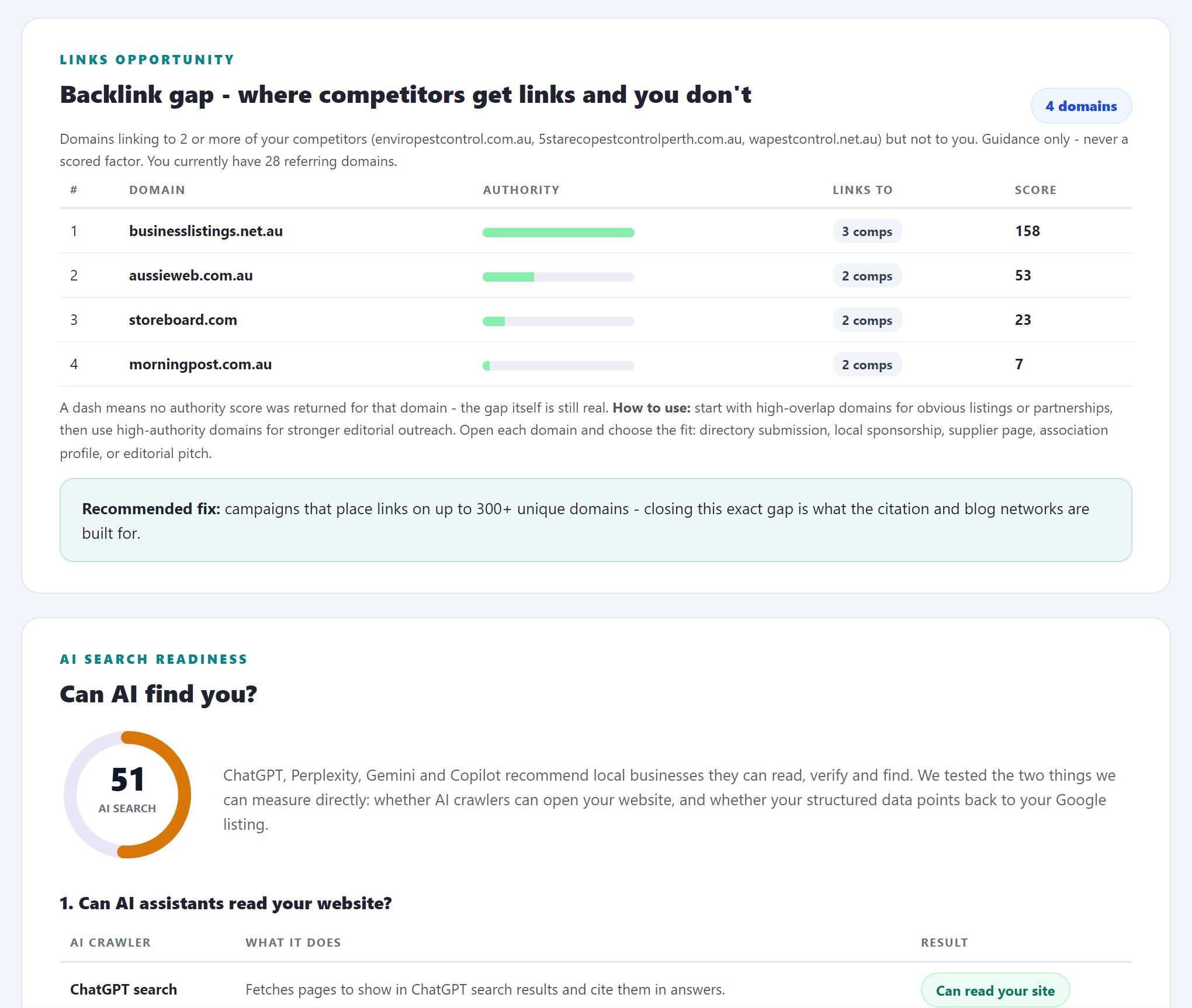
Do it yourself: Honest answer: there is no good free way. Free versions of backlink checkers show a sliver of the picture. The approximation that costs nothing: search for local directories, suppliers, associations and news sites in your city, and check by hand whether they link to your competitors. Anything linking to two rivals and not to you goes on a list.
What good looks like: Your authority within striking distance of the pack, and a shortlist of sites that link to two or more competitors but not to you. That shortlist is your link building plan, pre-validated by your own market.
The usual mistake: Buying generic links from nowhere in particular. The gap analysis exists precisely so you spend on the links your market has already given out.
Part 4: Site performance
Real mobile speed
Nearly every map pack click is a phone click. A page that takes six seconds to paint hands a share of your ranked-for and paid-for clicks straight back to the pack, where the next result is one thumb-move away. Speed is not a ranking factor you chase for its own sake; it is the tax on every click you have already earned.
Pure Controls scored 75 on mobile, level with the competitor median, but with a 4.2 second LCP: a passable score hiding a paint time that fails the bar in this check. The report keeps every competitor's score next to it, because "the site feels slow" starts arguments and a scored comparison ends them. The usual culprits are oversized images, an accumulated pile of scripts, and cheap hosting; all three are fixable without a rebuild.
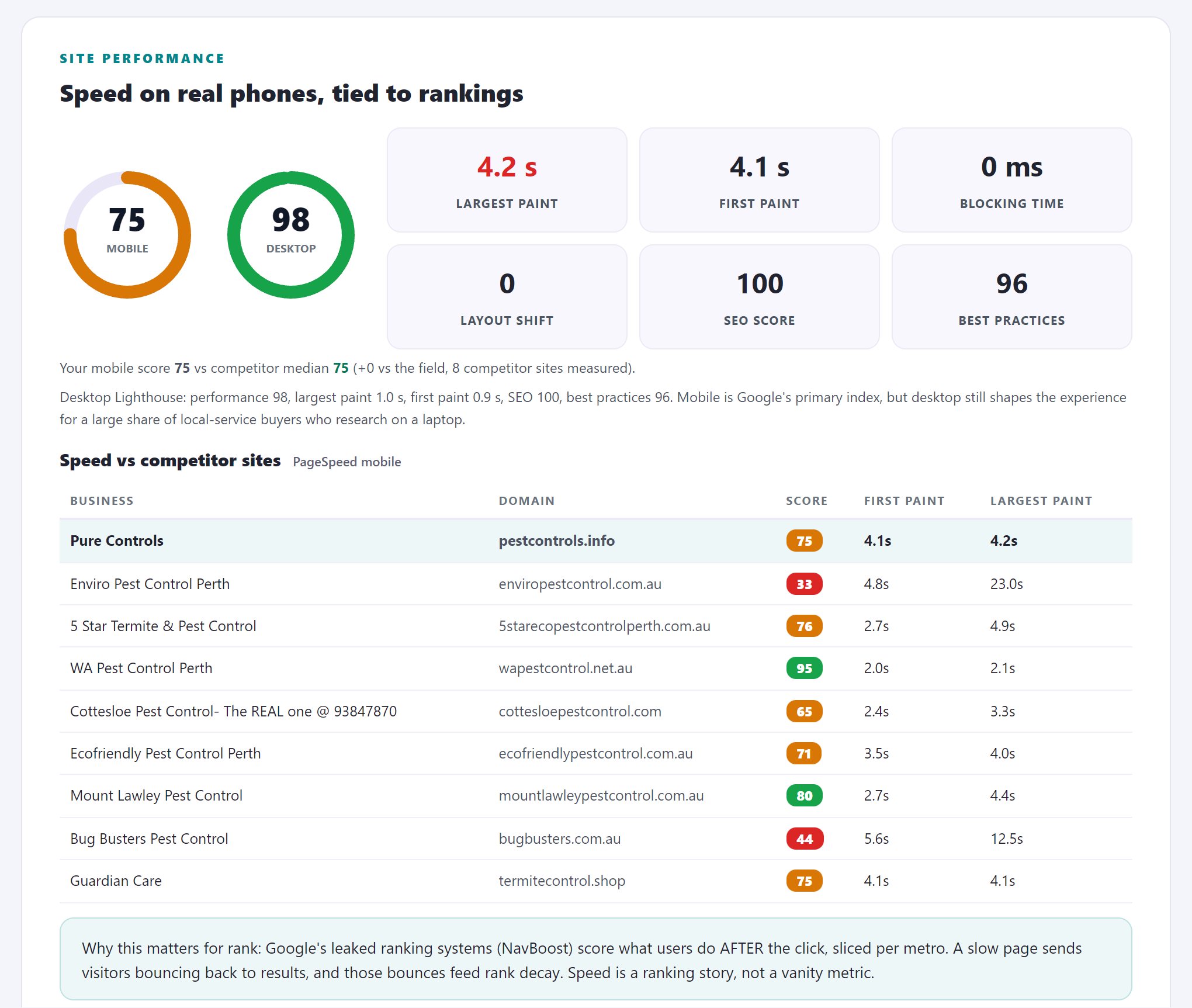
Do it yourself: Run PageSpeed Insights, which is free, on the page your profile links to. Look at the mobile score first, and at LCP (how long the main content takes to appear) specifically. Then run your top competitor and compare.
What good looks like: Mobile LCP under 2.5 seconds. Most local sites we audit fail this, which also means passing it puts you in the minority of your own market.
The usual mistake: Testing on the office wifi from a desktop and concluding the site is fine. Your customers are on phones, on mobile networks, standing in a parking lot with a burst pipe at home.
Part 5: Map visibility, the part almost every audit skips
Here is a hard fact about nearly all audits, whether you pay for them or not: you might get a 95 out of 100 on every point listed above and still not show up at all in half of your target area. The profile checks only look at what you put in. Only rank checks show what comes out, and since rankings change based on the searcher's location, testing from just one spot gives you a story, not real data.
A geo grid scan is the tool used for this: it checks the same keyword from many different locations throughout your service area, with each spot showing your real local ranking. This is the core of our audit, and it is genuine. Manually checking a keyword from 49 separate locations would require physically driving around your city with your phone. Instead, we use location-accurate ranking data, which comes from a commercial provider and requires payment. For every audit, we purchase this data at each grid point for five keywords per report. This expense is what separates an audit that simply grades your profile from one that reveals your actual visibility to customers. That is also why most free audits only include a screenshot of your own profile in their most detailed section.
The rank map, per keyword
Even three honest manual data points usually surprise owners. The full grid turns the surprise into a picture: green where you win, amber where you hang on, red where you exist, dark where you are simply not in the results. It is the one artifact from an audit that a client understands in five seconds with no explanation, which is why the rank map is the first page people share.
Read the Perth map below. Top 3 at exactly 1 of 49 points. Top 20 at 48 of 49, so the business is technically present almost everywhere and effectively chosen almost nowhere. Share of Local Voice, the report's single ownership number, came out at 49.9%: a real contender, not the default choice anywhere. The averaged rank was 11, which is exactly the kind of number that invites "we rank fine" while the northern half of the city cannot see you.
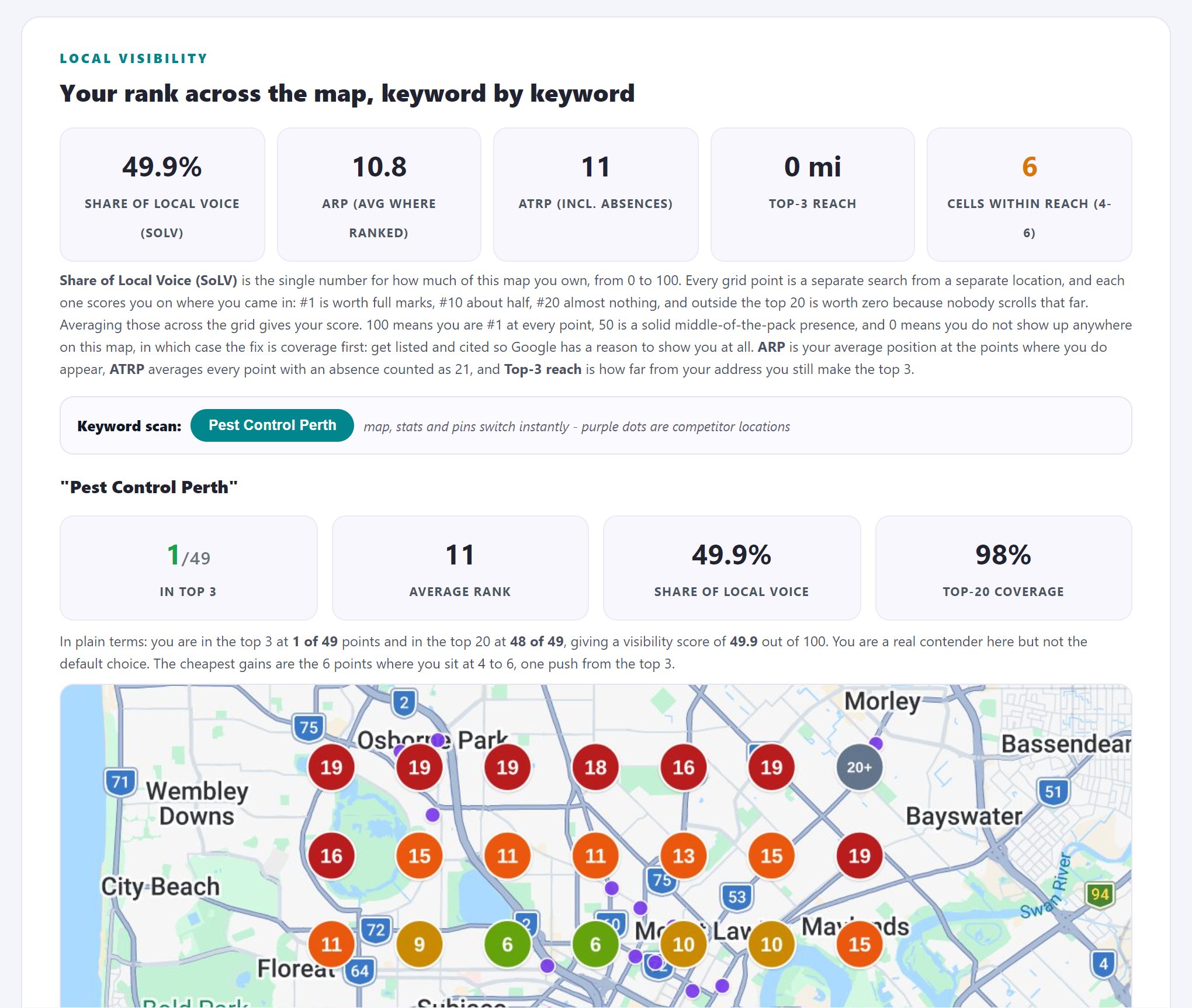
Do it yourself: The free approximation: search your keyword from your actual phone at a few real locations around your area (outside your shop, the far edge of your service area, a block you want to win) and note your pack position at each. Airplane-mode tricks and location spoofing are unreliable; your feet are not.
What good looks like: Top 3 at your own address is the minimum bar. What you are really mapping is the radius where you hold top 3, and where it collapses. Every business has a collapse radius; winners know theirs.
The usual mistake: Checking rankings from the office, logged into your own Google account, and reporting that number to anyone. Personalisation and proximity make it the single most flattering data point available.
Attack zones
Ranked position data becomes a plan the moment you sort it by winnability. Position 4 and position 14 are not the same problem: one is a nudge, the other is a campaign. The Perth grid found 6 cells at positions 4 to 6, sitting one push from the top 3, most of them south of the river. That sentence is worth more than the rest of the report to whoever plans the next quarter, because it converts "do SEO" into "win these six blocks".
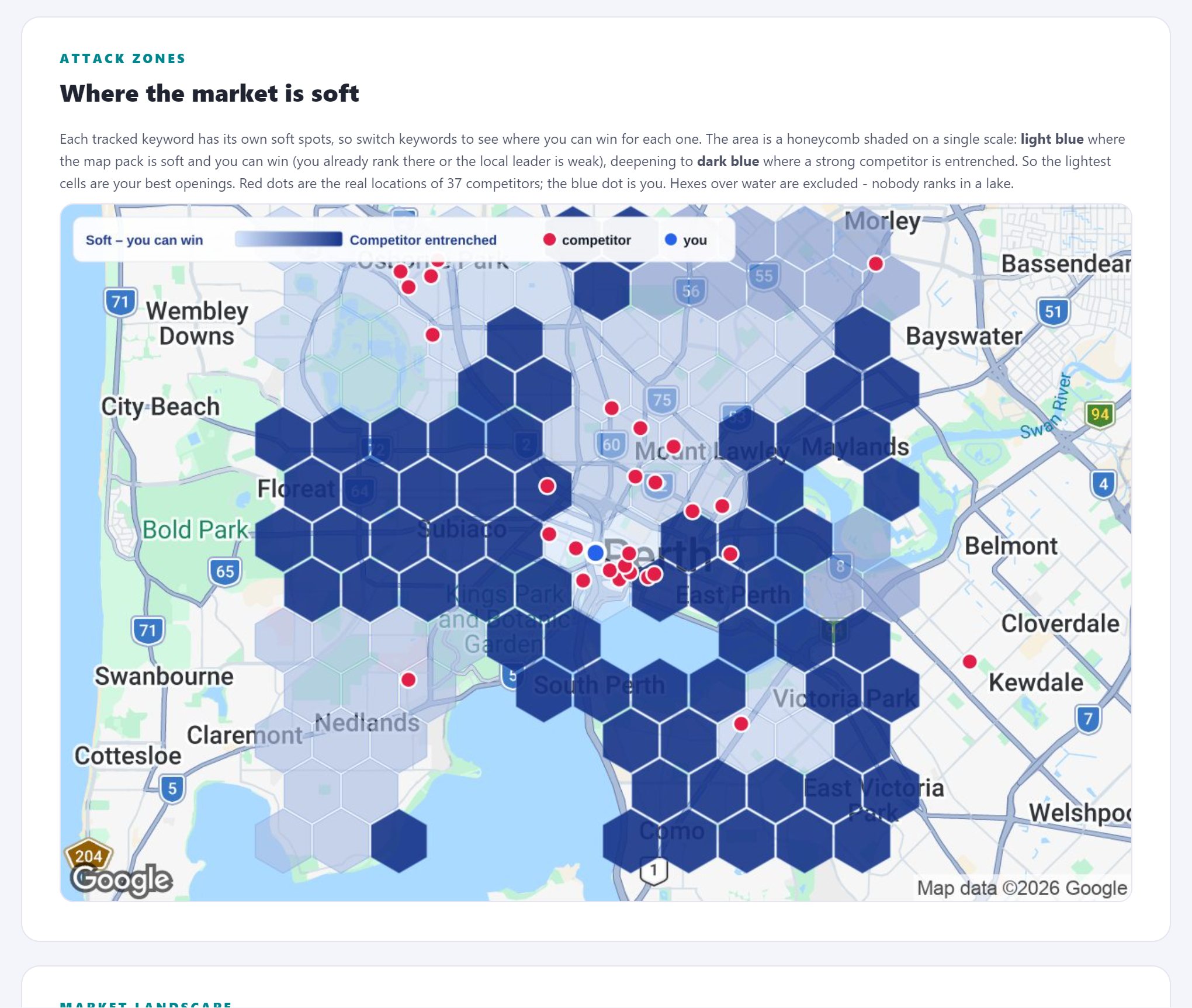
Do it yourself: From your manual check points, find the spots where you rank 4 to 7. Mark them on an actual map. Those are winnable with focused work; the position-18 areas are a different, longer project.
What good looks like: A shortlist of specific blocks where a small push (a review surge, a city-relevant link, a landing page for that suburb) flips you into the pack.
The usual mistake: Spreading effort evenly across the whole service area. SEO budgets die in the averages; they win in the near-misses.
Competitor benchmark and market share
Across a full grid this becomes a market share table: what percentage of all top-3 slots each business owns across the area. The reframe matters psychologically as much as tactically. "Rank better" is a wish. "Take share from the company that owns the northern suburbs" is a strategy with a scoreboard, and the benchmark table tells you exactly what that company has that you do not: in Perth's case, three hundred more reviews and an actual backlink profile.
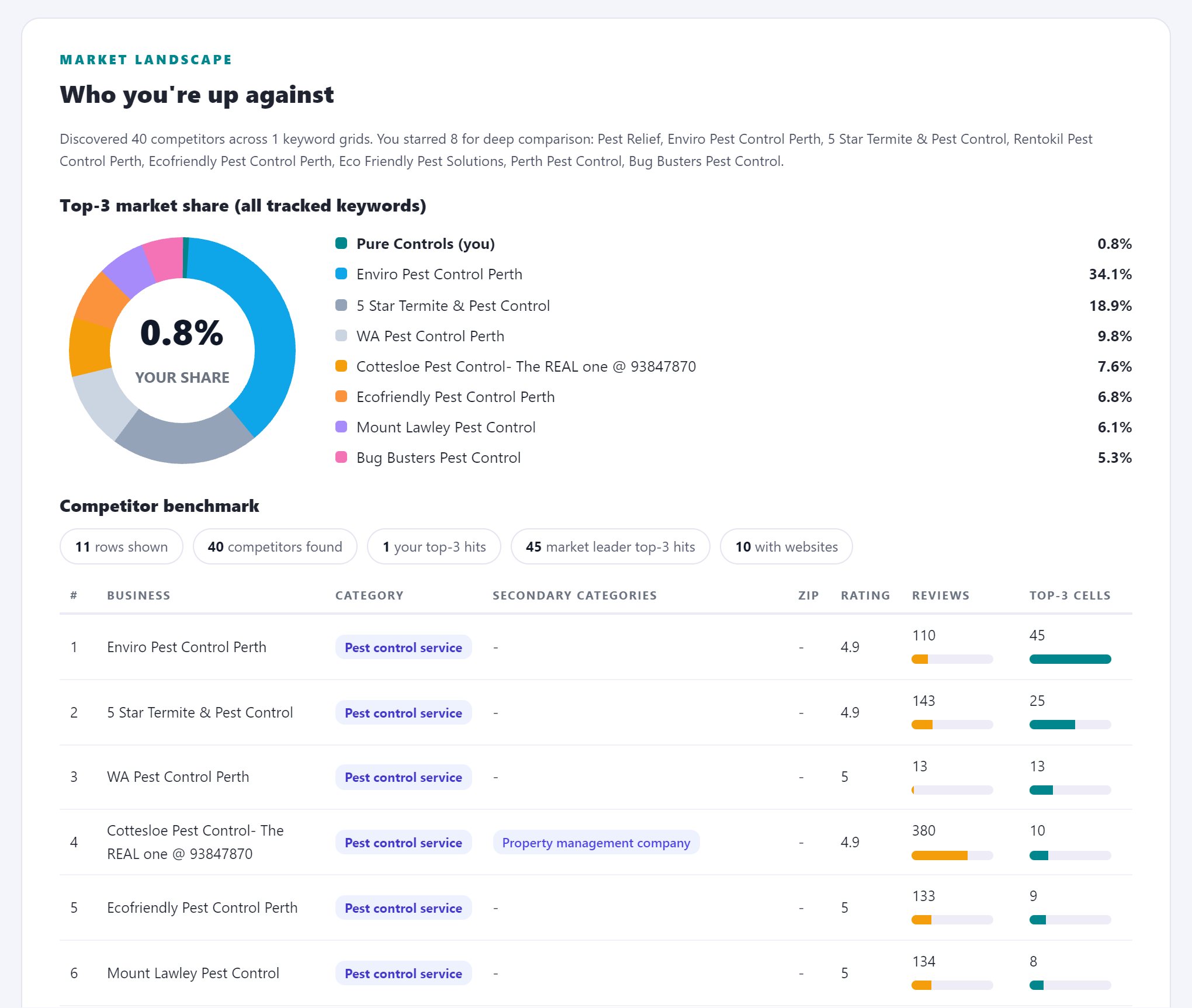
Do it yourself: At each manual check point, write down who holds positions 1 to 3. After five points you will see the pattern: the names that repeat are your real competitors, and they are often not the ones you had in mind.
What good looks like: You know exactly which two or three businesses own your market, their coverage, their ratings, their review velocity and their categories, so every other check in this guide has a target number attached.
The usual mistake: Benchmarking against the business you consider your rival instead of the ones Google keeps choosing. The pack does not care about your industry politics.
Service keyword gaps
Most businesses rank for their name and one service, and silently miss every other line of business they sell. Emergency work, commercial variants, installation versus repair: each is its own search with its own pack. The gaps are usually better opportunities than the keyword you are already fighting for, because the fight has not started there yet. The report's search gaps section builds this list from what competitors rank for and you do not, which is the same method as the backlink gap: let the market tell you where the unclaimed ground is.
Do it yourself: List every service you sell. Search each one plus your city. Note where competitors appear and you do not. Cross-reference with the words customers used in their reviews from check 5.
What good looks like: A ranked list of searches you are absent from, ordered by what the click is worth to your business, not by search volume.
The usual mistake: Chasing the biggest keyword in the market while ten smaller service keywords sit uncontested. The aggregate of the searches nobody fights over is usually larger than the one everybody does.
AI search readiness
AI assistants do not read your Business Profile the way Google Maps does. They assemble answers from the wider web: directories, review platforms, articles, structured data. A profile that dominates the map pack can be absent from the assistant's answer because the sources it reads never mention you. It is early, the volumes are still small, and the direction is one-way, so an audit in 2026 should at least measure it. Ours does, and the fix list it produces overlaps heavily with checks 9 and 11, which is convenient: the work pays twice.
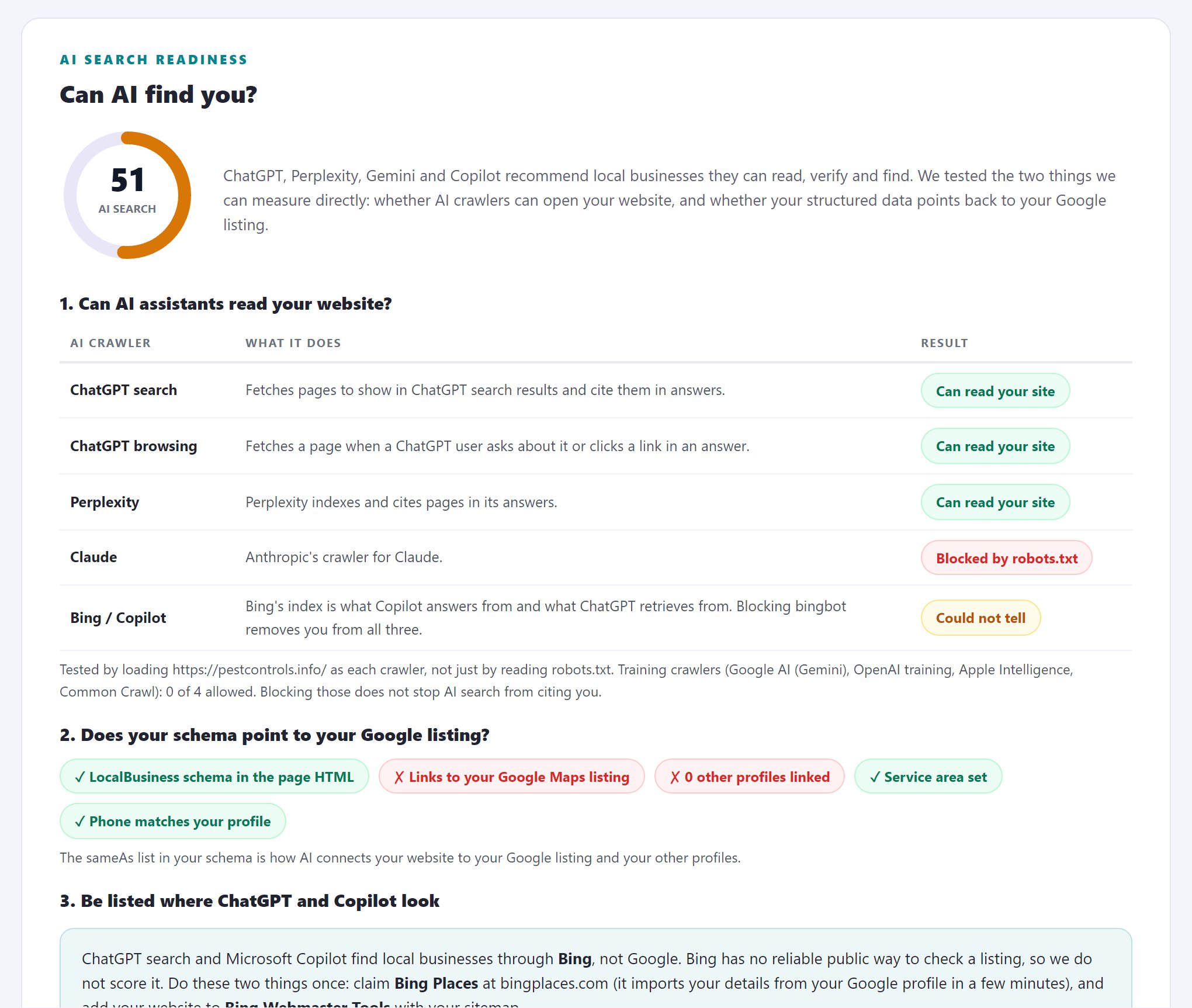
Do it yourself: Ask an AI assistant the question your customer would ask: 'who is the best [service] near [suburb]?' Note whether you are mentioned, and, where the assistant cites sources, which sites the answer was assembled from.
What good looks like: You appear in AI answers for your core service, or at minimum you know which directories, review sites and articles the answers draw on, because presence on those is how you get into the answer.
The usual mistake: Ignoring it because the traffic is small today, or panicking because of a headline. It is early; the move is to measure now and build presence on the sources, not to rebuild your strategy around it.
Part 6: Turning 18 checks into a plan
If you do not analyze your data, your audit will just become another PDF that no one looks at again. The final three steps can be done in one evening, require no money, and are what give value to all the previous eighteen steps. Without these, you have only described your business, not truly audited it.
Score it, and rank the issues by impact
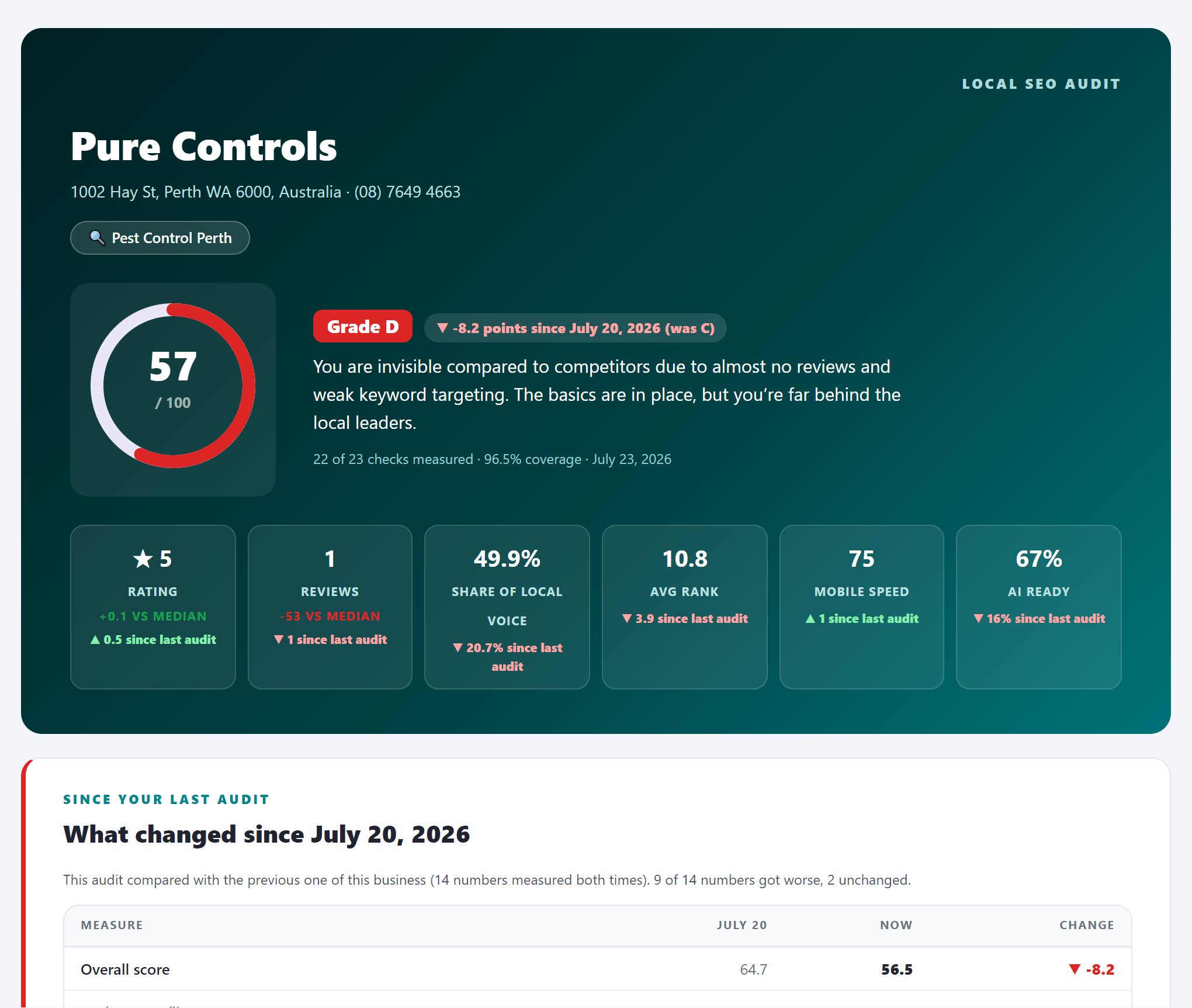
Our reports open with exactly this synthesis: an overall score with an A to F grade, the biggest issues ranked by impact with a concrete fix attached to each, and an executive summary above everything. For Pure Controls that page read: 57 out of 100, grade D, and three critical issues in order: review count (1 versus a median of 361), review pace (0 in 90 days), and website authority (domain rank 0). Whoever reads only that page still leaves knowing what to do first and why.
Do it yourself: Give each of the 18 checks a pass, weak or fail. Then order the failures by expected impact, not by how easy they are to fix: category fit and map visibility gaps almost always outrank a missing photo. Write one line per issue: what is wrong, why it matters, what fixing it should change.
What good looks like: One page: a grade, the top 5 issues in impact order, and why each one matters, readable by an owner in two minutes.
The usual mistake: Leading with the easy fixes to show quick progress. Quick wins are for momentum, not for the top of the list; the top of the list is for the issues that move revenue.
Put a number on the gap
We compute this as a revenue impact estimate in every report, deliberately conservative, because owners do not buy rankings. They buy the calls the rankings carry. The number converts the entire audit from a technical document into a business decision, and it also gives you the honest off-ramp: if the gap is worth $400 a month, do the free fixes yourself and stop there. If it is worth thousands, the conversation changes.
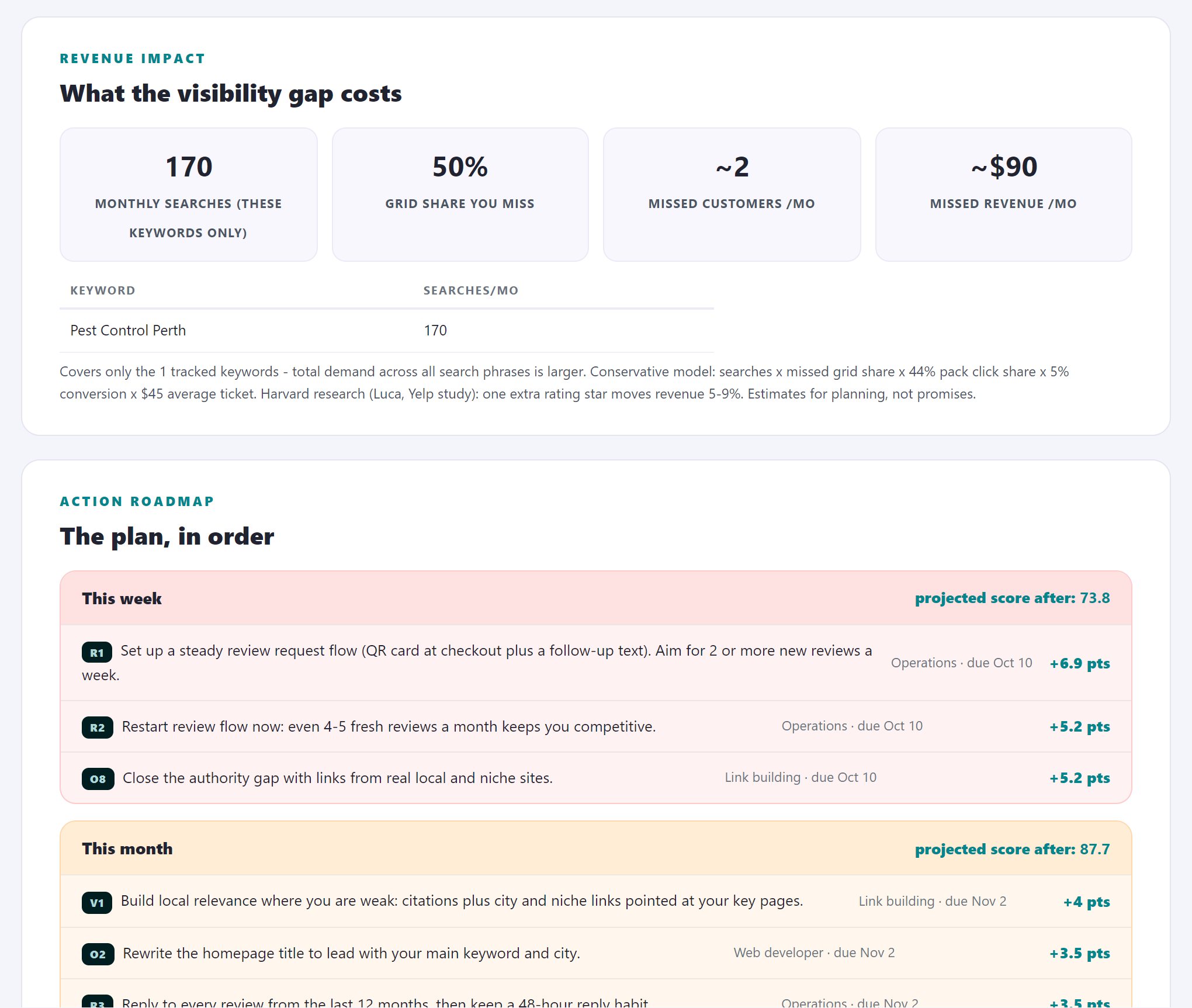
Do it yourself: Rough math is enough: monthly searches for your keywords, times the share of clicks your current positions earn, times your close rate, times average job value. Run it once at current positions and once at target positions. The difference is the monthly cost of the gap.
What good looks like: A sentence like 'the visibility gap is costing roughly 14 calls a month'. Suddenly the audit has a budget attached, and the fixes have a payback period.
The usual mistake: Inflating the estimate to make the case. Use conservative numbers everywhere; a defensible small number moves decisions further than an impressive one nobody believes.
A roadmap with dates, and the evidence behind it
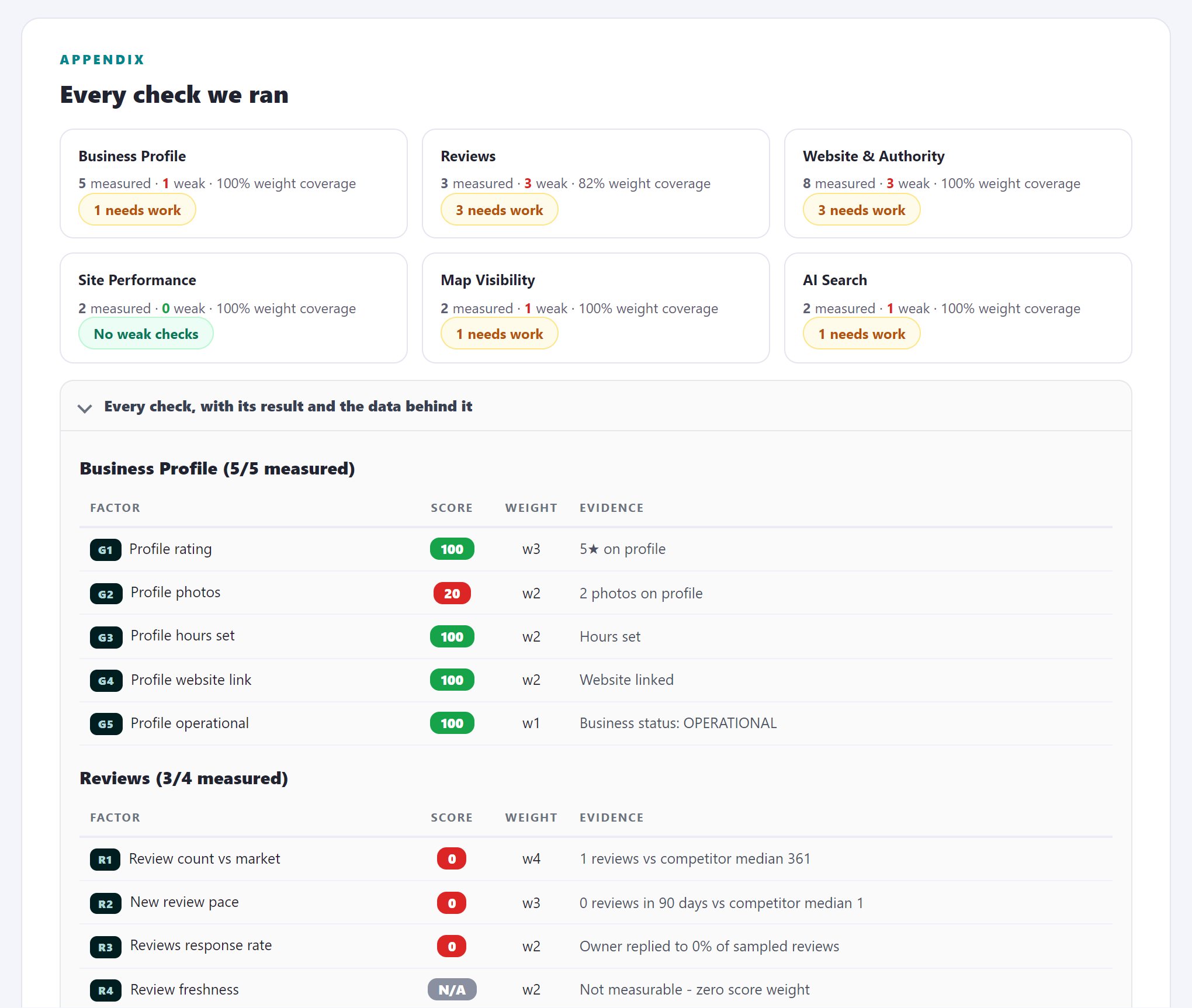
Every audit we produce ends with this roadmap and an evidence appendix: every check we ran and the data behind it, so a skeptical owner, or the agency's skeptical client, can verify any line in the report. The Perth report measured 22 of 23 checks, which it weights to 96.5% coverage, and says so on the cover; the methodology section even lists what the audit deliberately does not fake. An audit you cannot verify is an opinion with a cover page, and the local SEO industry produces a great many of those.
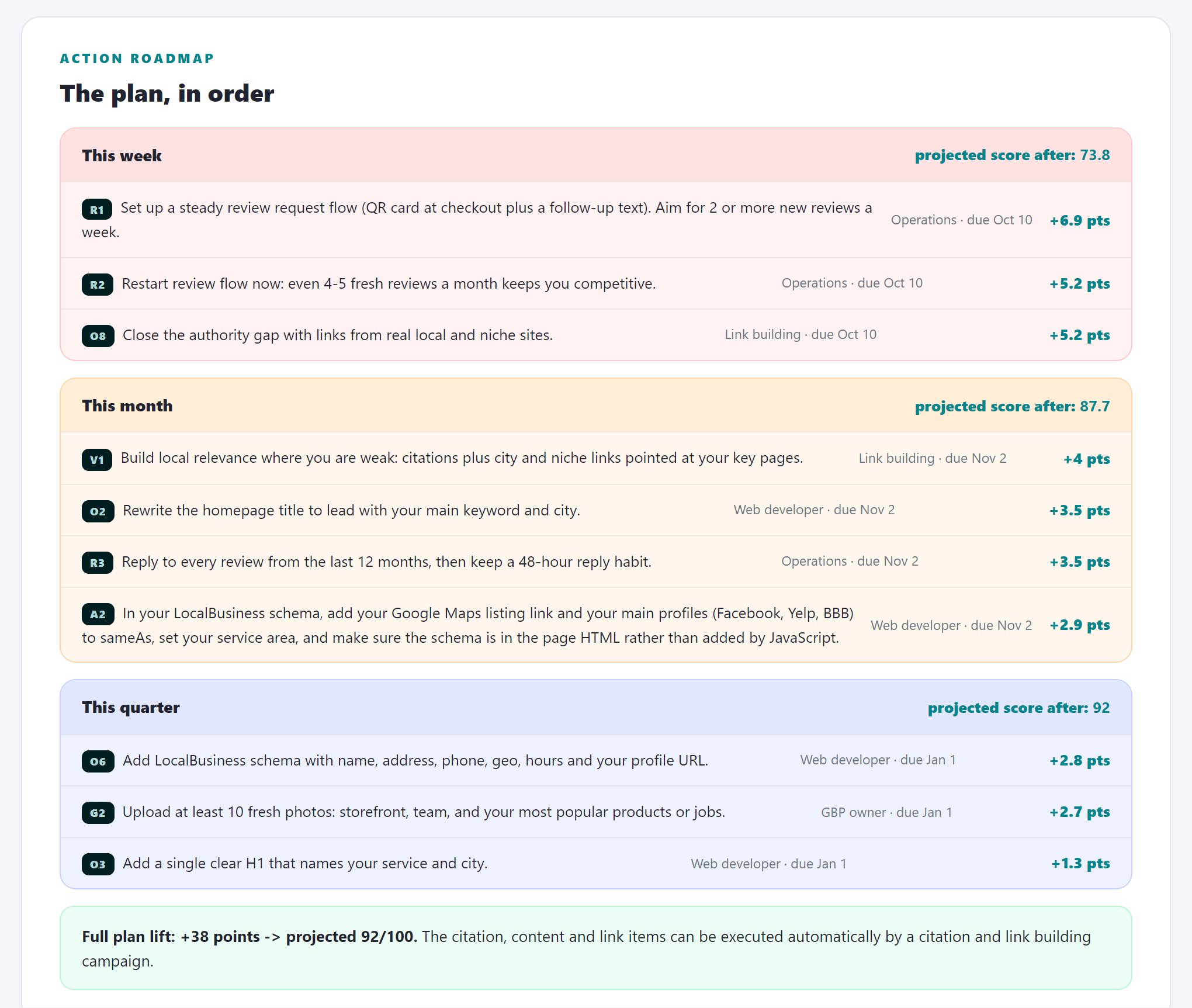
Do it yourself: Split every fix into this week (profile fields, title tag, review replies), this month (citation cleanup, a review velocity system, the first landing page), and this quarter (links, content, the attack zones). Assign each an owner. Put the re-audit date in the calendar before you close the document.
What good looks like: Three lists with owners and dates, plus the raw data saved, so the re-audit measures movement instead of guessing at it.
The usual mistake: No re-audit date. An audit without a scheduled second measurement is a snapshot, and snapshots do not hold anyone accountable, including you.
The full case study: five stars, grade D
Let’s look at the Perth data as a whole, since the combined picture is more unusual than each detail by itself. Pure Controls operates as a genuine pest control business from a physical location on Hay Street. It holds a flawless 5.0 rating, is listed in the right category, and has an active, verified business profile. According to all major free audit tools, this company performs strongly, so its owner would likely feel confident after checking.
The comprehensive audit gave a D grade, scoring 57 out of 100, with all lost points due to factors a profile scan cannot detect. There was only one review compared to a market median of 361. No reviews have been posted in the last 90 days. The domain rank is zero, while competitors have built up years of backlinks. The rank map shows position 2 right outside the entrance, but 19 or lower throughout the northern half of the city, and just one top 3 ranking out of forty-nine grid points. Share of Local Voice sits at 49.9%. That might seem acceptable, but the map shows all the green concentrated in a single corner.
This case is important for your audit because all the metrics that hurt this profile were hidden at first glance, yet each can be corrected: a review system addresses the velocity gap, the backlink gap list provides a roadmap to build authority, and the six attack-zone cells pinpoint where you can get early results. The audit did not reveal a poor business; instead, it showed a solid business that simply had not been evaluated before. That is what we see most often, and it is the main reason to audit beyond just the surface profile.
How to run all 21 checks in one report
You can handle all of this manually, but expect to spend a full day and pay for data for three of the checks. Now, we will show you the alternative we created, including actual screenshots, so you can see what automation looks like. Setting everything up takes roughly two minutes.
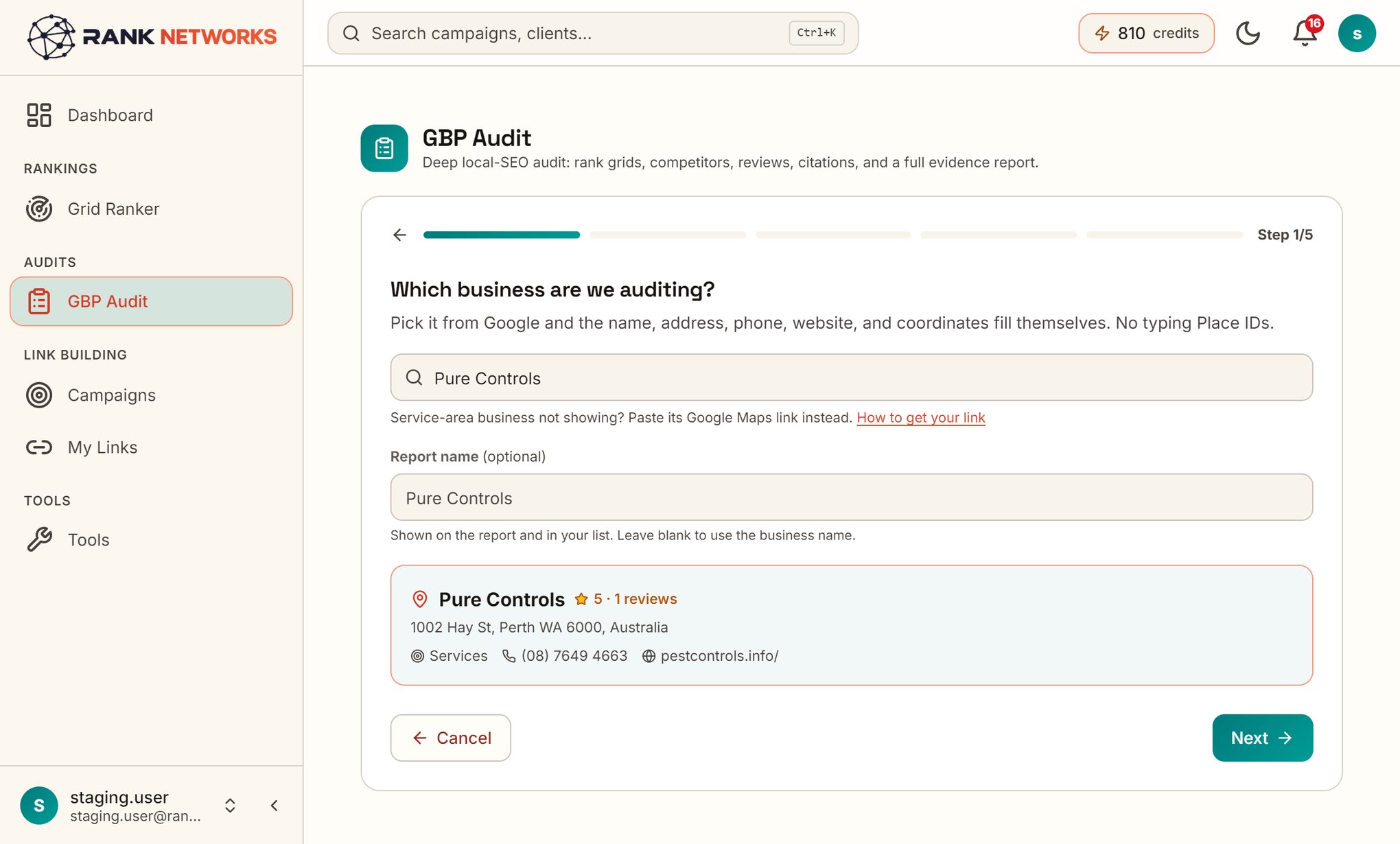
Step 1: Pick the business
Click on GBP Audit in the sidebar and select New Audit. Enter the business as you would on Google Maps, using its name and city. The tool automatically pulls in details from Google, including name, address, phone number, website, and coordinates. You do not need to enter anything manually or look for Place IDs.
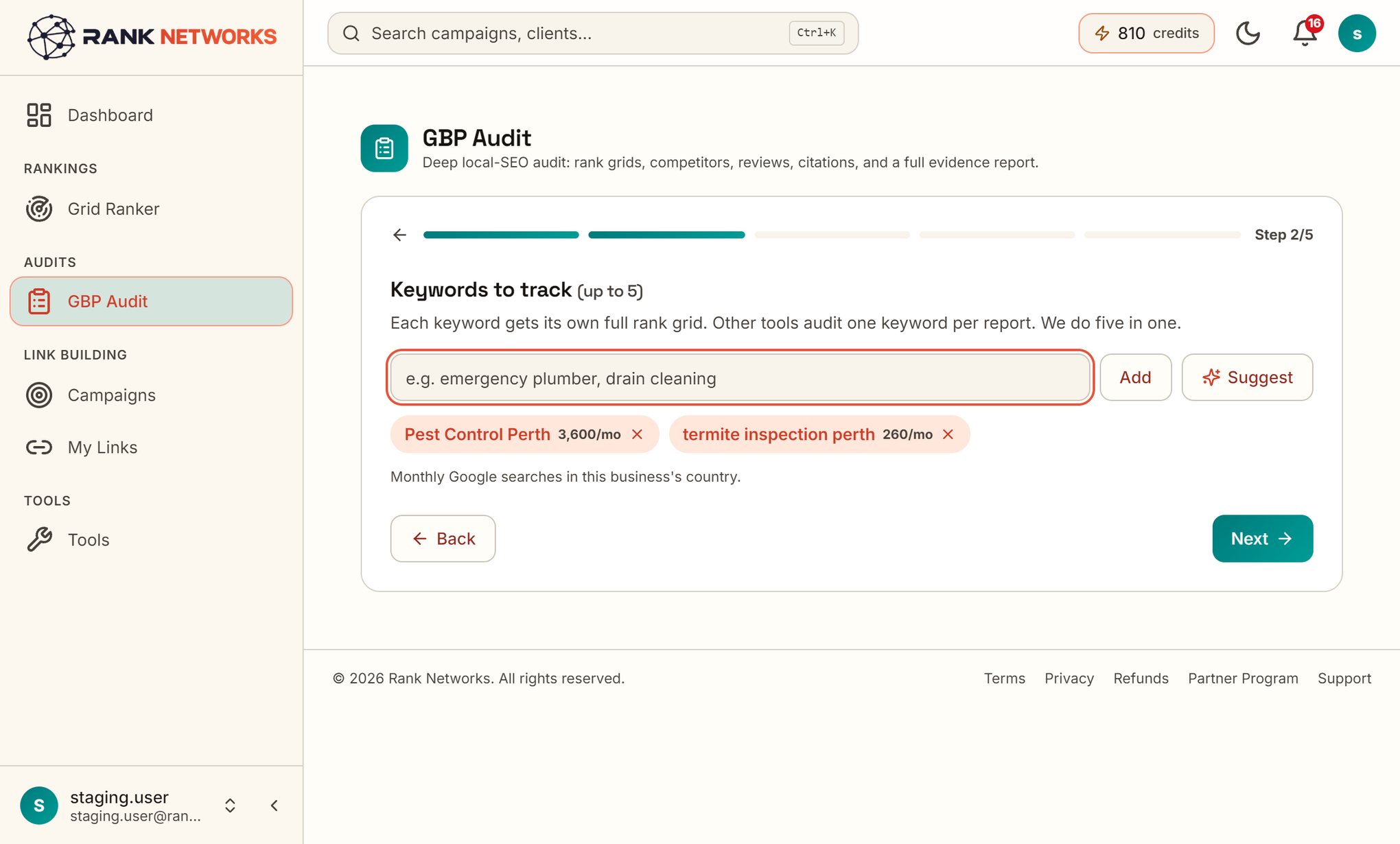
Step 2: Choose the keywords
Limit your choices to five, following the earlier keyword guidance: select your main service, a high-margin option, and any areas you think competitors are missing. The rank grid will use these keywords, so focus on search terms that bring in revenue, not just those that look impressive.
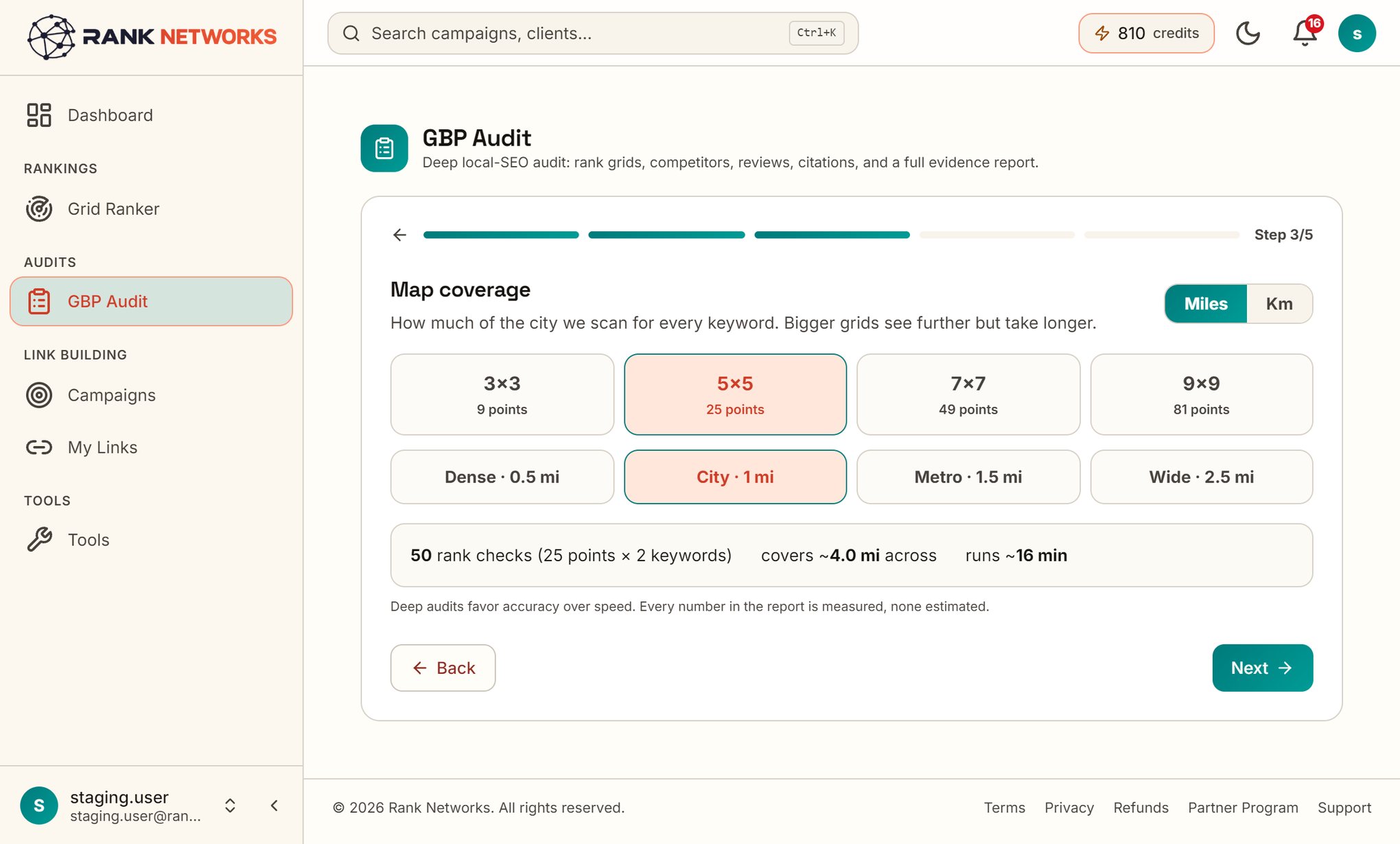
Step 3: Set the map coverage
Here you set the grid, which determines how far out from the business your rank checks will go. Match the grid to the actual service area, just like the reading-the-map section advised. A small grid may look better, but an accurate grid gives you real insight.
Step 4: Mark the competitors that count
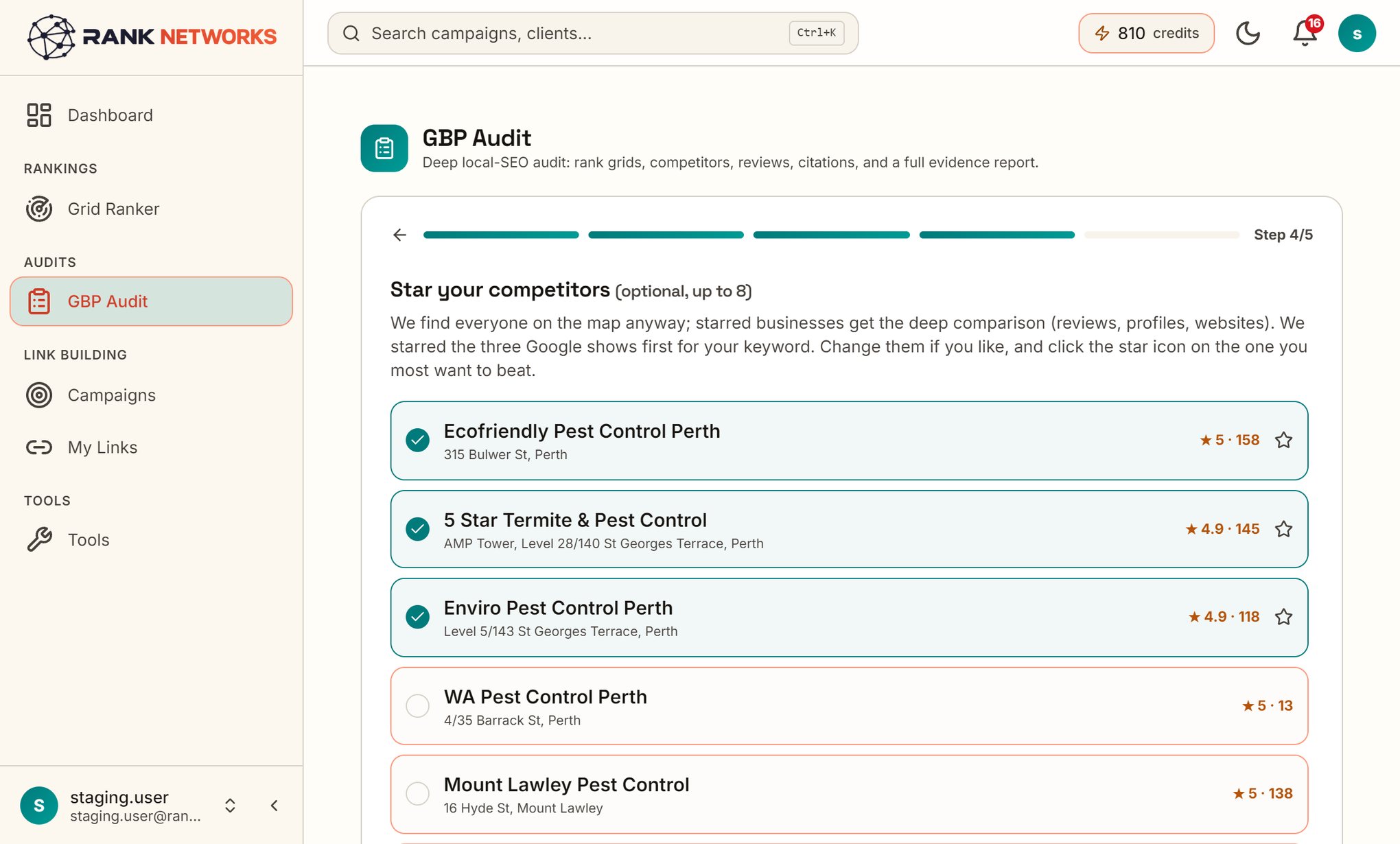
The report automatically benchmarks all businesses it detects in the packs. With this step, you can select up to eight specific competitors to track directly against each other. You will see their attributes, hours, services, reviews, and coverage compared side by side.
Step 5: Launch, and read the report
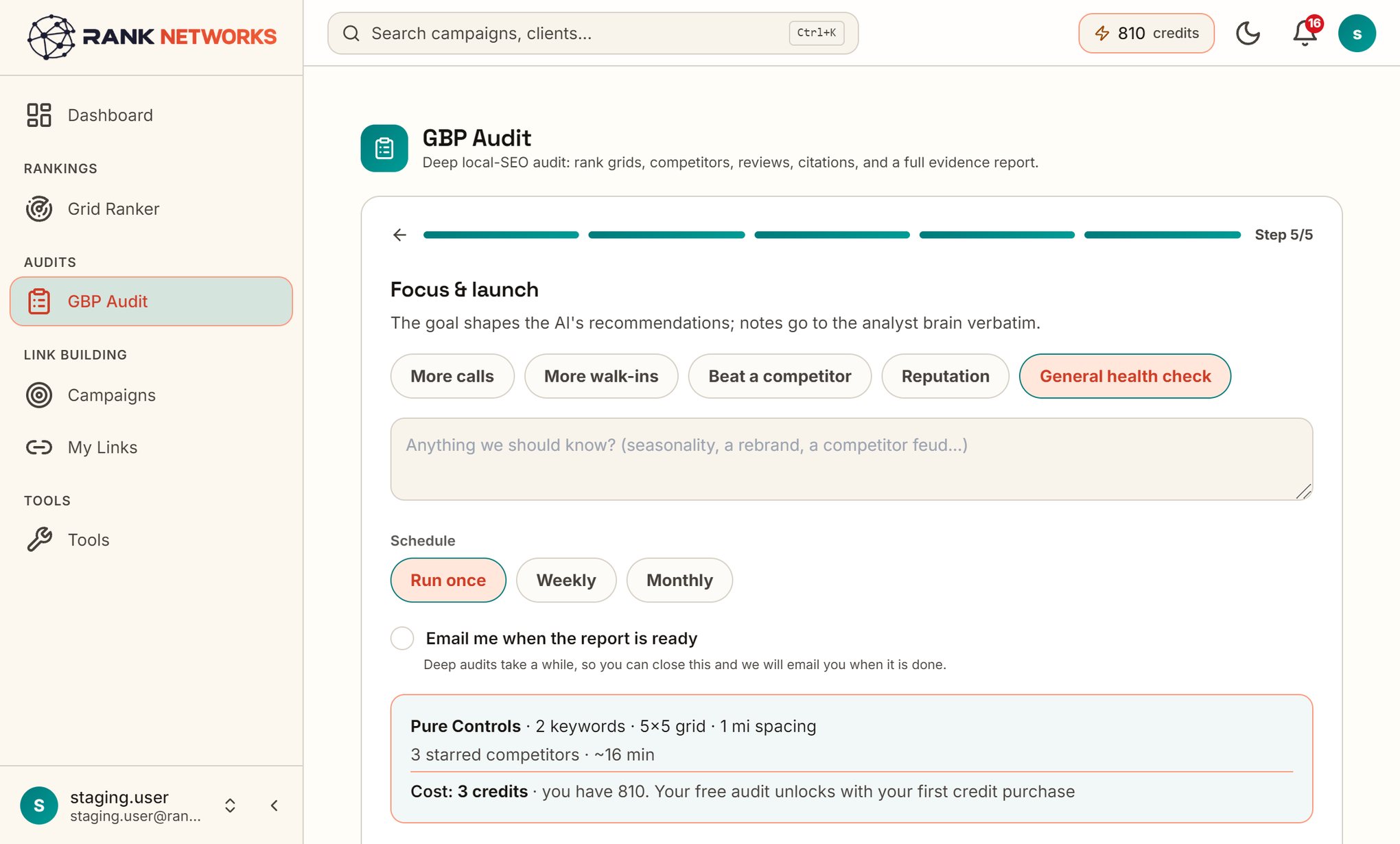
The final step validates the focus and executes all the processes described in this guide together: checking profiles, comparing the review engine with competitors, reviewing the website and schema, testing mobile speed against all rivals, performing a citation audit, analyzing authority and backlink gaps using licensed link indexes, generating a complete ranking grid for each keyword, assessing AI readiness, and compiling the results. This includes the score, identified issues, projected revenue effects, and a roadmap, all supported by an evidence appendix.
You can share the completed report using a link, which lets an agency send it directly to a client or an owner share it with a business partner, all without needing to attach files. All the screenshots shown in this guide are taken from one of these shared report pages.
What this costs, honestly
Checks 1 through 10, 13, and 15 to 21 only require your time, and you can complete them today using this guide. Checks 11, 12, and 14 are not the same: large-scale citation audits, backlink databases, and rank tracking with location accuracy rely on paid data sources, and whoever provides them is covering those costs. We purchase access to these data providers and include all 21 checks in a single automated report: five keywords, a complete rank grid for each, competitor benchmarking, citation difference, revenue projection, and a dated action plan, all produced in minutes rather than taking a full day.
This is also the reason we charge for our audit, instead of pretending "free" means just a profile screenshot and a sales pitch. We pay for the data that goes into a proper audit. When you buy your first credit pack, it covers your initial audit, and each additional audit requires a few credits.
Run all 21 checks in minutes
The full report you saw in this guide: graded score, rank map for five keywords, competitor benchmark, citation sweep and a dated roadmap. First audit included with your first credit pack.
Which keywords to audit, and how many
Each visibility check above is performed for every keyword, so making the wrong choice here can undermine half of your audit without you noticing. A common error is to focus on keywords you hope to rank for, instead of those that actually drive business. Build your shortlist from three sources: search terms from your profile’s performance report (queries that already bring you traffic), phrases customers use in reviews and during calls, and the service list you made in check 2. From these, select keywords that represent different search intents, not just variations of a single service: your main service, an emergency or high-margin option, and the service with the largest gap identified in check 17. For most local businesses, five keywords is a realistic and effective number, which is why our reports always include five; using just one gives a false impression, and using twenty makes the audit unfocused.
Avoid focusing on brand keywords. Appearing in search results for your business name is the bare minimum and does not provide useful insight unless you are not ranking for it. If you are missing here, that is a major problem and should be addressed first, as it often points to a duplicate listing or a suspension issue related to check 4.
Reading a rank map without fooling yourself
A grid creates an image, and images can lead to two common errors. The first is discouragement: seeing a map with a red border can seem negative, but all businesses have a zone where results drop off, even the top performers. The important issue is not "is there red," but "where is the red in relation to your customers and profit areas." Red shading over an industrial area is just background; red covering the suburb with your highest-value jobs is significant. On the Perth map, the key red area was the northern suburbs: these are densely populated, residential, and home to the households most likely to need pest control.
The second error is being overly optimistic by only looking at a small area near your location and feeling good about the green results. Make sure your grid matches the real area where you provide services, not just the distance that makes your screenshot look good. Always compare results using the same grid size, spacing, and keyword each time, or else any changes will reflect adjustments in your setup, not actual improvement. Running one consistent 7 by 7 grid on a regular schedule is more reliable than doing several one-time scans.
The audit tool landscape, honestly mapped
There are four main types in the market, and identifying which one you are using helps you interpret its findings. Free profile scanners let you enter a business and quickly rate its basics: how complete it is, which categories it uses, photos, review totals, and sometimes a quick look at the website. These are handy for a quick check, but they cannot measure speed, citations, authority, or map presence, and are usually designed to lead into a sales pitch. So, if you get a "nothing wrong" result, it only means nothing is wrong on the surface. Browser extensions add category and review count overlays to Maps as you use it. These are actually helpful for tasks 1 and 16, but since you have to do it by hand, you see only one pack at one spot at a time.
Static checklists like this one explain the process and are free to use. Their downside is that they cannot perform tasks automatically, and people tend to skip the repetitive checks when doing them manually. Full measurement platforms, which is the type we offer, add paid data sources (such as rank grids, link indexes, and citation sweeps) and combine them into a scored report you can share. The real compromise is the price, so the best approach is to start with the free checks in this guide, and only pay for measurement tools when you need data you cannot get for free, like velocity, authority, or map results. For most businesses that are stuck, this is usually necessary.
There is a limit that affects all species, including us: an external audit cannot access your Search Console queries or analytics. Viewing those requires the owner's login and addresses a separate issue (what Google currently sends you) compared to the audit (what the market could send you). The most effective quarterly review combines both sources.
After the audit: the 90-day pattern that works
An audit works like a diagnosis, and diagnoses themselves do not determine rankings. When we look at audits that clients actually use, the most successful quarters follow a similar pattern. Here is that pattern as a basic plan for you to adjust as needed.
Weeks 1 and 2, the free fixes: We update the primary category to match what the market expects, complete all missing profile fields, confirm business hours, rewrite the title tag and H1 on the connected page, add schema, and respond to all outstanding reviews. This work takes one concentrated afternoon and about an hour from a developer. For businesses with only basic issues, these steps can sometimes resolve everything.
Weeks 2 to 6, the systems: The review request process starts running (after each finished job, same day, with a direct link), and citation cleanup begins: we update the main listings, remove duplicates, and fix the aggregators so related sites update over the next few weeks. You will not see a ranking change this month from these steps, but both actions build long-term results.
Weeks 4 to 12, the prominence phase: we turn the backlink gap list into outreach and link placements, while the attack zones receive focused attention: creating a suburb landing page where there is a true content gap, and directing city-specific links to the pages that target those neighborhoods. Most business owners hand off this stage to others, but our campaigns automate it: building citations, city-focused content, and niche content with links, all targeted at the exact gaps identified in the audit. The audit ensures your budget addresses specific, measurable issues instead of just "doing SEO."
Day 90, the re-audit: use the identical keywords, grid, and settings. The difference between these two reports is the real measure of progress: SoLV increases, attack zones reverse, and the velocity gap gets smaller. If there is no change, the re-audit shows you which lever was not pushed far enough, which is better than waiting a year and guessing.
Five audit myths that waste your quarter
Myth 1: "Publishing more posts will solve ranking issues"
Posts are the most prominent feature in the dashboard, so people often rely on them too much. They work for driving conversions and sharing updates, but they are not among the most effective tactics. We have not seen regular posting turn around a business that has a category mismatch or is falling behind on review growth. Address eligibility and visibility issues before posting; share updates only after your basics are in order.
Myth 2: Ranking number one is meaningless if you do not include a location
Any time someone claims "we rank number one," you should ask, "according to which location?" Being logged into your own account and searching from your office will always show the best possible result for you. The real statement should be "we are in the top 3 for N% of our service area," but few can say this since hardly anyone has actually checked. Pure Controls could honestly say "we rank number 2," but the grid revealed what that statement left out.
Myth 3: "The rating is what matters"
Ratings cluster. In most packs everyone sits between 4.4 and 4.9, and the deciding signals are volume, velocity and recency, which do not cluster at all. A five star business with one review just graded D in this very guide. An audit that reports your rating and stops has measured the thing least likely to explain your position.
Myth 4: "Citations are dead"
Citations have not driven growth for years, but the industry has gone too far by overlooking them completely. They are a basic necessity: having inconsistent or duplicate listings can divide your entity and your review record, and AI assistants check directories more often than most SEOs. You are not creating citations to improve rankings; you are cleaning them to make sure your existing efforts are not wasted.
Myth 5: "A free audit didn’t find issues, so everything is okay"
A free audit measuring the profile found nothing wrong with the profile. The expensive problems in the case study above were all invisible to it: velocity, citations, authority, and a rank map with one green corner. Absence of findings is not health; it is usually absence of measurement, and the checks that need paid data are precisely the ones where the findings hide.
Auditing a service-area business: what changes
Service businesses like plumbers, electricians, cleaners, and pest control companies that visit clients and keep their address private follow some unique guidelines. When reviewing these types of businesses, a few steps in this guide will be different.
First, even with the address hidden, proximity still connects to an actual place, so the grid maintains a center point and the collapse radius from check 14 is still relevant. What changes is that your service area suggests you cover more ground than your rankings actually support, and the difference between these two is the most critical insight an SAB audit can reveal. Pure Controls displays its address, but the same issue is present: the stated service area includes all of metropolitan Perth, while the grid revealed strong visibility in only about half of that region. For an SAB, you should run the grid across the area you say you serve, not just where you currently rank, or else you are measuring the wrong commitment.
Second, the website carries more weight. With no storefront generating drive-bys, photos of jobs, suburb service pages and review anchors do the work signage does for a shop. The suburb landing pages from the attack-zone play are the SAB's main relevance lever, one honest page per real service area, never a template with the suburb swapped: Google filters doorway pages, and thin duplicates put the whole domain at risk.
Third, check 4 is more demanding. Service Area Business (SAB) profiles get suspended more frequently than storefront listings because the hidden-address requirements are tougher: you cannot display your address anywhere, including photos or a website footer that conflicts with your profile. If your SAB listing vanishes from the map, start by reviewing these rules.
The 15-minute monthly pass
All 21 items should be reviewed during a biannual audit. This monthly checklist will catch almost every issue that can develop over time. Schedule it for the first Monday of each month.
Minutes 1 to 3: Open the profile in an incognito window. Make sure it is live, the hours are accurate, and there are no pending Google edits. Minutes 4 to 7: Check for new reviews for your business and the top two competitors; update your current review velocity; respond to any reviews that have not been answered. Minutes 8 to 12: Search your two main keywords from two real locations, or review last month's grid if you follow a set schedule, and record any changes in the key target areas. Minutes 13 to 15: Upload one photo from a real job completed this month, then write a single-line log entry about rank changes, the review gap, or anything unusual. After twelve months, those log entries make up your year-end report.
A note for agencies: auditing at scale
Manual audits that take a full day are not practical when you have thirty clients. At agency scale, the checks often get reduced to just a quick profile review, which is exactly what this guide criticized at the start. For agencies offering local SEO, the audit is both your first deliverable and the main reason clients renew, and both rely on the two tasks that are toughest to do by hand: the rank grid that highlights the issues, and the scheduled re-audit that demonstrates improvement. That is why our report starts with the map and the revenue figure instead of a checklist. Those are the two sections that clients actually look at on their phones.
Where to start if this feels like a lot
It is a lot to take in. That is intentional: audits that can be done in fifteen minutes usually do not uncover any issues. Still, you do not have to set aside a whole weekend to get started. Begin with checks 1, 6, and 14 today: compare your category to the top performers, measure your review rate against competitors, and check your actual ranking from three unbiased locations. Completing these three checks takes less than an hour and reveals most of the costly issues we encounter; they would have identified two out of the three major issues in the Perth report. If all three checks show no problems, you are likely leading the pack that others are trying to catch. If not, you will know which of the other eighteen checks are relevant, and the plan in check 21 will help you turn your findings into a manageable quarter’s work instead of ongoing stress. In either case, schedule your next audit before you move on. Measuring once is just trivia; measuring regularly is how you manage.
The whole checklist on one screen
Add this to your notes app. Every line is detailed above.
The profile
1. Primary category matches what the top 3 use for your money keyword
2. Every field filled, hours true, website link goes to the right page
3. Photos: competitive count, something new in 60 days, real work shown
4. Profile live, no silent Google edits, no keywords stuffed in the name
Reviews
5. Count and rating within range of the pack leaders
6. Monthly review velocity at or above the pack median
7. Replies on most reviews, negatives answered within a day
Website and authority
8. Title tag and H1 name the service and the city
9. LocalBusiness schema present and matching the profile
10. Name, address, phone identical on site and profile
11. NAP consistent across the major directories, no duplicates
12. Authority benchmarked, backlink gap list built (paid data)
Performance
13. Mobile LCP under 2.5s on the linked page
Map visibility
14. Rank checked across the area, not from one desk (paid data at full scale)
15. Attack zones: the 4-to-7 positions marked and targeted
16. Real competitors identified from the packs, share measured
17. Every service searched, gaps listed by value
18. AI assistant answers checked, source sites noted
Synthesis
19. Graded score, issues ranked by impact
20. Revenue number on the gap, conservative math
21. Week / month / quarter roadmap, re-audit date booked
Questions people ask
How do you do a local SEO audit?
Begin by reviewing your Google Business Profile, then move on to your reviews, followed by the website your profile points to. Next, check your citations and backlinks, and finally, look at your actual rankings throughout your service area. Rate each issue by how much it limits your visibility and address them based on that priority. The 21 steps in this guide are organized in this exact order.
What is a GMB audit?
GMB means Google My Business, which is what Google Business Profile used to be called. A GMB audit is the same as a GBP audit. Both terms refer to reviewing how your listing and the related information Google uses are optimized for ranking on Google Maps.
Is a local SEO checklist the same as a local SEO audit?
Not exactly. A checklist simply lists what you need to review, while an audit documents your findings, compares them to the businesses in your local map pack, and prioritizes what to fix. You should use this checklist as a tool for your audit, then save your results so you can track changes during your next audit.
How do I audit my Google Business Profile?
Address five key areas in sequence: start with your profile (including category, completeness, photos, and hours), then reviews (number, how quickly you get new ones, and owner responses), your website (title, headings, schema, and consistent name and phone number), site speed, and finally, map visibility (your ranking throughout your service area, not just at your business location). The 21 checks in this guide look at each of these areas, and nearly all require only your time, not money.
How long does a Google Business Profile audit take?
Doing just a profile-only pass by hand usually takes between 15 and 30 minutes. Completing a full audit by hand, which covers citation checks on top directories, review pattern comparisons with competitors, and rank tracking over a grid of locations, will take most of a day. That is why these more detailed checks are most often automated.
Are free Google Business Profile audit tools any good?
Free tools work well for an initial check. Typically, these tools assess your profile’s basics like completeness, categories, photos, posts, and number of reviews. However, they generally do not provide details such as your ranking in different parts of your service area, how quickly you gain reviews compared to others in your market, or which websites link to your competitors but not to you, since this information requires paid data sources. Start with a free tool to find simple issues, then consider if it makes sense to pay for more advanced analysis.
How often should I audit my Google Business Profile?
Conduct a comprehensive audit every six months, and do a quick monthly check: make sure your profile is still active and has not been changed by Google, look over any new reviews, and review rankings for your top two or three keywords that bring in revenue. If you experience a suspension, rebrand, relocation, or a sudden decrease in calls, perform a full audit right away.
What is a good Google Business Profile audit score?
You can only compare scores within the same tool, since each tool uses its own weighting for checks. The important thing is not the score itself, but the changes you see over time and how you stack up against other businesses in your local map pack. In this guide, the Perth business received a 57 out of 100 and a five star rating. The score was on the lower side because the market comparison was tough, and that comparison is what really matters.
Can I do a Google Business Profile audit for free?
Mostly, yes. Eighteen of the 21 checks in this guide cost nothing but time: the profile checks, review checks, on-page website checks, speed, and all of the synthesis steps. The exceptions are the citation sweep at directory scale, the backlink comparison, and the full rank grid, which sit on commercial datasets. You can approximate all three by hand in a smaller way, and this guide shows how.
What is a geo grid rank scan?
A geo grid scan measures your Google Maps ranking for a single keyword from multiple locations arranged in a grid over your service area, such as 49 spots each one kilometre apart. Since Google shows different local results based on the searcher’s exact location, using a grid reveals the full ranking landscape that an average position would miss. You can see where you rank in the top 3, where you drop to page 2, and where your business does not show up.
Why does my Google Business Profile rank differently in different areas?
Proximity is a key factor in local rankings, alongside two other main pillars. Google considers how far each potential business is from the person searching, so someone searching from two suburbs over will get a different local pack than someone right near your location. Your relevance and prominence signals stay the same, but proximity is updated for each search. This is why your rankings drop as the searcher gets farther away, and why it is important to measure how quickly those rankings decline with distance.